
IPTV Pro can refer to an Android media player, a paid streaming subscription, or a seller using “Pro” as a marketing label. Those are not the same product. Before paying, identify whether you are buying an app license, access credentials from a provider, or both.
This guide explains the difference, shows current Digital Lizard IPTV plan totals, compares devices, and gives practical setup and troubleshooting steps. It also covers the checks a U.S. buyer should complete before choosing a longer subscription.
Table of Contents
Table of Contents
What Is IPTV Pro?
IPTV Pro is commonly the name of a media-player app that loads television streams from a separate source. It does not automatically create a subscription or grant access to paid channels. A user normally needs an authorized playlist or account details supplied by an internet television provider.
The official Google Play listing for Alexander Sofronov’s IPTV app describes M3U and XSPF playlists, XMLTV and JTV guide data, several channel views, and internal or external players. It also identifies Pro features such as an ad-free interface and an option to start the app when the device boots.
That distinction matters because a polished player cannot fix an unreliable stream source. The app organizes and plays the data it receives; the provider controls account status, available categories, connection limits, source quality, and access credentials.
IPTV Pro player vs. IPTV subscription
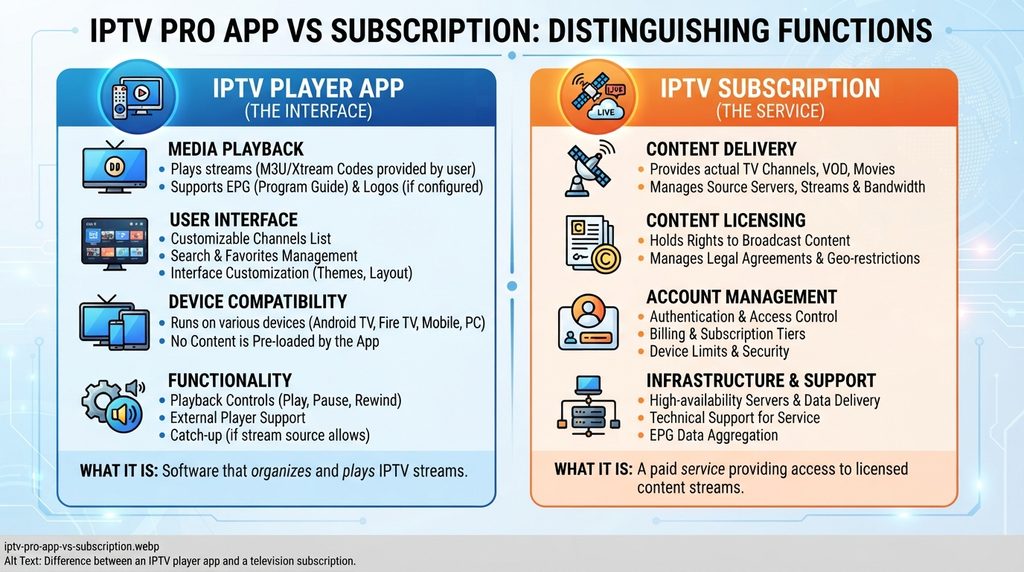
An IPTV player is software. It provides the interface used to add a playlist, browse categories, view program information, save favorites, and start playback.
An IPTV subscription is the service that supplies the account. Depending on the provider and player, the account may include a server address, username, password, remote playlist URL, or program-guide URL.
| Component | What it does | What it normally does not do |
|---|---|---|
| IPTV Pro player | Loads compatible playlists, displays channels, reads EPG data, and plays streams | Supply licensed channels or create a provider account |
| IPTV subscription | Supplies access details, categories, connection limits, and service support | Guarantee compatibility with every third-party app or device |
| Internet connection | Transfers the stream to the device | Fix an expired account or an incompatible player |
| Streaming device | Runs the player and decodes video | Increase the number of simultaneous connections in the plan |
A common purchasing error is paying for a player and expecting channels to appear automatically. Another is buying a subscription without checking whether its login format works with the chosen app.
What the official Android listing confirms
The Google Play description states that the app can display streams from an internet service provider or another legitimate source supplied by the user. This makes the app a playback tool rather than a channel provider.
App availability can vary by country, account, hardware, and Android version. Use the device filter in Google Play before paying because a phone app may not be optimized for an Android TV remote.
Avoid websites offering modified or “unlocked” APK files. An unofficial package may be outdated, altered, or disconnected from the developer’s normal update path.
What Do You Need to Use IPTV Pro?
You need a compatible Android device, the IPTV Pro player or another suitable player, a stable internet connection, and authorized account or playlist information. The app alone is not enough. Confirm the login method and device support before buying a subscription.
Prepare these items before setup:
Do not publish or forward account credentials. Treat them like a password.
Account credentials and playlist data
Different players accept different account formats. Use the format supported by both the app and provider; never convert credentials through an untrusted website.
Electronic program guide data is separate from the video stream. Playback can work while channel schedules remain blank, which usually points to an EPG refresh, source, or mapping problem rather than a failed subscription.
IPTV Pro Features That Matter Most
The useful features are the ones that reduce daily friction. A large feature list matters less than reliable playlist loading, readable program data, remote-friendly navigation, and stable playback on the actual device.
Player-side features
The official Android listing identifies these core capabilities:
- M3U and XSPF playlist support
- XMLTV and JTV program-guide support
- Grid, list, and tile channel layouts
- Internal and external video-player options
- Playlist history
- Parental controls
- Ad-free use in the Pro version
- Start-on-boot support in the Pro version
Start-on-boot can be useful on a dedicated Android TV box. External-player support can help when one decoder handles a stream better than the default player.
Provider-side features the app cannot control
The player cannot determine whether a channel source is online, whether an account has expired, or how many people can stream simultaneously. It also cannot guarantee 4K playback merely because a menu contains a 4K label.
Actual picture quality depends on the source, encoding, device decoder, home network, internet route, and display. Buffering may originate from any of those points, so changing apps is not always the correct fix.
Support quality also belongs to the provider. A useful provider should explain accepted login formats, connection limits, setup steps, renewal terms, and the process for reporting an account problem.
IPTV Pro Pricing: App Cost vs. Subscription Cost
IPTV Pro pricing has two possible parts: the player’s store price and the separate service subscription. Store pricing can vary by region and account, so check Google Play directly. Digital Lizard IPTV currently lists one-connection subscription totals from $16 for one month to $75 for twelve months.
The player and service should appear as separate purchase decisions. Paying for the Pro player does not pay the television provider, and paying a provider does not necessarily include a premium app license.
Current Digital Lizard IPTV pricing
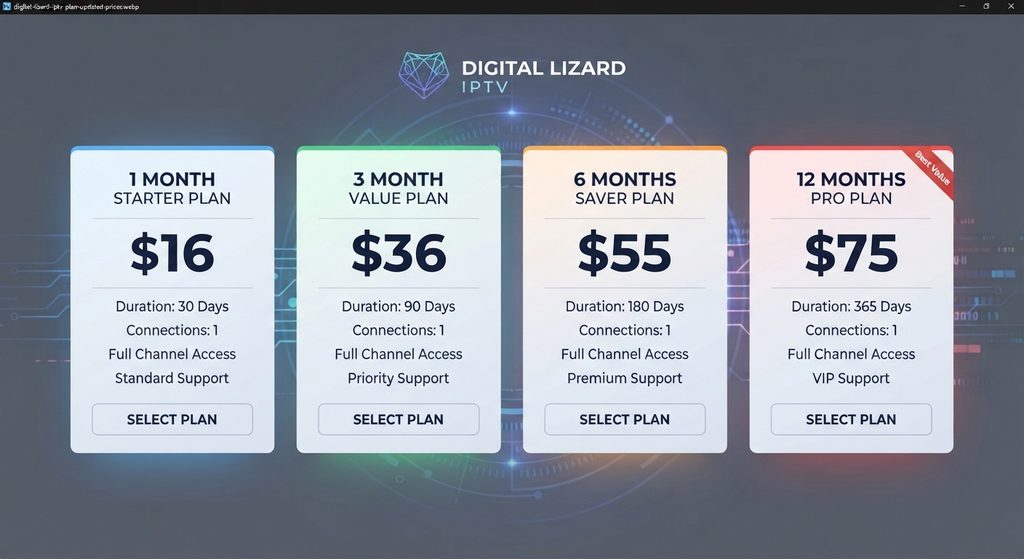
The current Digital Lizard IPTV pricing page lists these totals for one simultaneous connection:
| Duration | Total price | Effective monthly cost | Best suited to |
| 1 month | $16 | $16.00 | Compatibility checks and short commitment |
| 3 months | $36 | $12.00 | Viewers who want a lower monthly rate without a long term |
| 6 months | $55 | About $9.17 | Established users who want fewer renewals |
| 12 months | $75 | $6.25 | Buyers who have already confirmed device and service fit |
These are total prices for one connection, not recurring monthly charges at the effective monthly amount. The subscription page shows the order total before submission.
Pricing for more simultaneous connections can differ. Use the current site selector and verify the final total at checkout instead of multiplying the one-connection price yourself.
How to compare value correctly
The annual plan has the lowest effective monthly cost, but it is not automatically the right first purchase. A shorter commitment can be more rational while device compatibility, login format, network performance, or content fit remains uncertain.
Compare the amount paid today, not only the advertised monthly equivalent. Also read the current refund policy because a guarantee label and the full eligibility terms are not interchangeable.
Which IPTV Pro Plan Should You Choose?
Choose the plan through two decisions: duration and simultaneous connections. Duration controls commitment, while the connection count controls how many screens can actively stream at the same time.
Choose by commitment
- One month: Best for a first paid period, a new device, or a network that has not been tested with the service.
- Three months: A middle option for someone who has confirmed basic performance but wants limited commitment.
- Six months: Suitable when the service is used regularly and the buyer wants fewer renewals.
- Twelve months: Best considered after compatibility, content needs, support, and household connection limits have been verified.
Connections vs. installed devices
A connection means a simultaneous stream. It does not necessarily mean the account can be installed on only one device.
For example, an account might be configured on a television and phone, but a one-connection plan normally permits only one active stream. Two screens playing simultaneously need a two-connection option.
Count real viewing behavior:
- List every screen that may use the account.
- Identify the busiest viewing period.
- Count how many screens will play at that exact time.
- Select at least that many simultaneous connections.
- Verify the final connection rule on the checkout page.
IPTV Pro Device Compatibility Guide
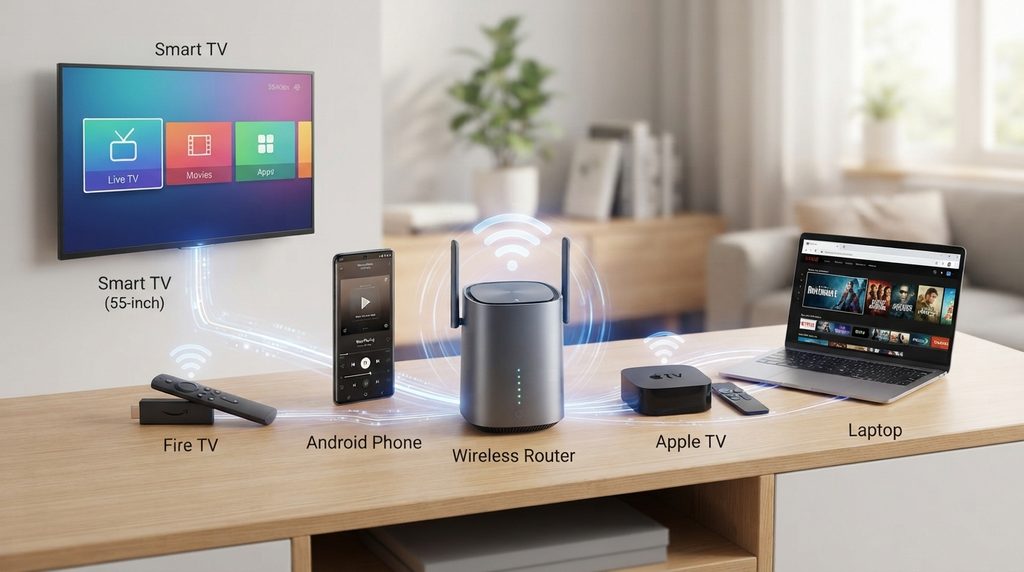
The specific IPTV Pro app discussed in the official Google Play listing is an Android product. A subscription may still work on other platforms through a different compatible player.
| Device | IPTV Pro app status | Practical route |
| Android phone or tablet | Check Google Play compatibility | Install from Google Play and add authorized playlist details |
| Android TV or Android box | Device-dependent | Use a TV-compatible Play Store listing and remote-friendly player |
| Fire TV Stick | Do not assume the Google Play version is available | Search the Amazon Appstore for a compatible player supported by the provider |
| Samsung Tizen or LG webOS TV | Not Android | Install a player made for the television’s own app platform |
| Apple TV, iPhone, or iPad | The Android app does not apply | Choose an App Store player compatible with the subscription format |
| Windows or Mac | The Android app does not apply natively | Use a supported desktop player or provider-recommended method |
The Digital Lizard IPTV setup guide covers Smart TVs, Fire TV, Android devices, and Apple TV. Application availability can change by device model and region, so search the official store on the target screen before ordering.
Android TV, boxes, and phones
Android offers the most direct route for the named IPTV Pro app. Google Play Help explains how to filter results by associated device so buyers can check phone, tablet, or television compatibility.
For TV use, prioritize remote navigation and screen layout. A phone app can technically install on some boxes yet remain awkward to control from a sofa.
Fire TV Stick
Fire TV uses Amazon’s app ecosystem. Amazon’s official instructions direct users to search from the Fire TV menu and download through the device interface.
Search for a compatible player supported by the subscription. Do not assume that instructions for an Android phone or the Google Play version of IPTV Pro apply unchanged to Fire OS.
Samsung and LG Smart TVs
Samsung Tizen and LG webOS are not Android TV. Use the television’s official application store and select a player built for the model, operating system, region, and provider login format.
Older televisions may have fewer apps or slower decoding hardware. A supported external streaming device can be simpler than forcing an incompatible application onto the TV.
Apple TV and Apple mobile devices
Apple’s official guidance says Apple TV 4K and Apple TV HD users can search the App Store and select Get or the displayed price. The Android IPTV Pro app is not an Apple TV app, so choose a tvOS alternative that accepts the account format.
App Store names can be similar. Confirm the developer, login methods, costs, privacy information, and compatibility before installation.
How to Set Up IPTV Pro on Android
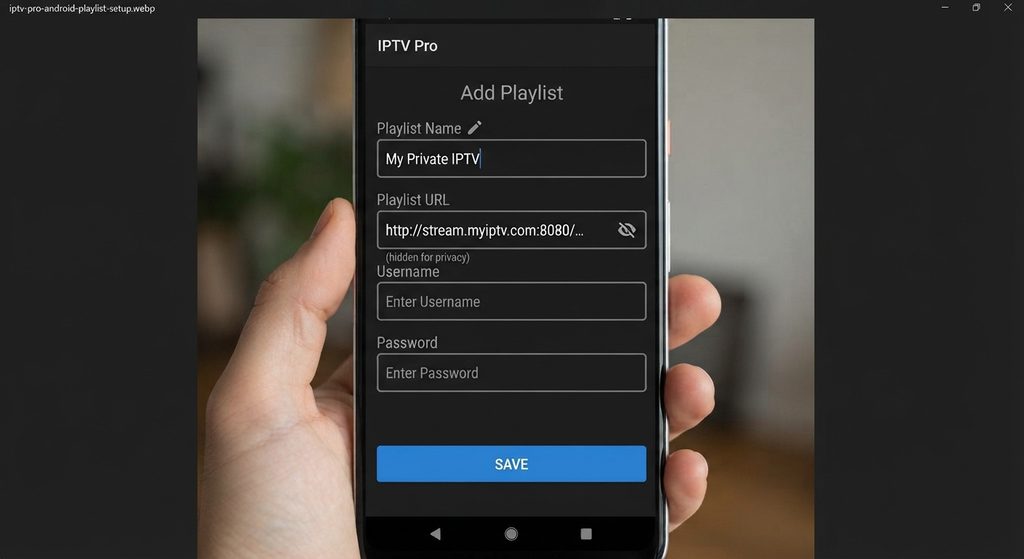
Install IPTV Pro through Google Play, open the playlist section, and enter only the authorized account or playlist information supplied by the provider. Save the profile, allow the playlist and EPG to load, then test several ordinary channels before changing advanced settings.
Step-by-step setup
- Confirm compatibility. Open Google Play on the target Android device and locate the correct app listing. Check the developer name and device support.
- Install the official version. Select Install or the displayed purchase price. Avoid third-party APK sites.
- Prepare the provider information. Keep the exact playlist URL and any separate EPG information ready. Do not add spaces or change capitalization.
- Create a playlist profile. Open the app’s playlist menu and select the option matching the supplied format.
- Enter the details. Paste or type the authorized URL carefully. Use a recognizable private profile name.
- Allow synchronization. Large lists and EPG data may need time to load on the first run.
- Test playback. Open several channels from different categories to distinguish a single-source issue from a general account problem.
- Organize the interface. Add favorites, select a useful view, and configure parental controls where needed.
Never share screenshots containing the full server URL, username, password, or token. When requesting support, redact sensitive values and send them only through the provider’s official support channel when necessary.
Common IPTV Pro Problems and Fixes
Troubleshoot from the simplest cause to the most specific one. Changing several settings at once makes it harder to identify what failed.
| Problem | Likely checks | Best first action |
| Login or playlist rejected | Typing error, spaces, expired account, wrong input format | Re-enter the exact details and confirm account status with the provider |
| Playlist loads but is empty | Source problem, invalid URL, temporary synchronization failure | Refresh once, restart the app, then contact the provider if it remains empty |
| EPG is blank | Guide refresh, missing EPG source, incorrect mapping | Run the guide refresh and verify the supplied EPG data |
| Playback buffers | Weak Wi-Fi, network congestion, device limits, source issue | Restart router and device, test Ethernet or stronger Wi-Fi, and compare several streams |
| App crashes | Outdated app, low storage, corrupted cache, device incompatibility | Update the app and system, restart, and check free storage |
| One screen stops another | Connection limit reached | Stop the other stream or choose the correct multi-connection plan |
| Audio works but video fails | Decoder or player issue | Try the app’s supported decoder or external-player option |
Login details are not accepted
Check unwanted spaces, uppercase and lowercase characters, and the server address. A credential set intended for one login method may not work in a playlist-only field.
If the same information fails in every supported player, the provider should verify account status. Do not keep submitting credentials to random “checker” websites.
Buffering or slow playback
Test more than one stream. One failing channel may indicate a source-specific problem, while every channel failing points more strongly to the network, device, account, or provider route.
Restart the streaming device and router. Close unnecessary apps, move closer to the access point, or test a wired connection where practical.
Do not accept “zero buffering” as a meaningful guarantee. No provider controls every home network, internet route, device decoder, and source at all times.
Missing program guide
Refresh the EPG and allow it time to populate. If channel playback works, avoid deleting the entire account before checking guide settings.
Some providers supply guide data inside the playlist, while others use a separate URL. The app and provider must agree on the format and channel mapping.
IPTV Pro Pros and Cons
| Pros | Cons |
| Supports established playlist and guide formats | Does not include a television subscription by itself |
| Offers multiple channel layouts | The named app is primarily an Android option |
| Can use internal or external players | Setup can be confusing when provider instructions are incomplete |
| Pro version removes ads and adds start-on-boot features | Playback quality remains dependent on the source, device, and network |
| Useful for users who want direct playlist control | Similar app names make store identification harder |
IPTV Pro is strongest for Android users who understand that the player and content source are separate. Someone seeking a single account with a fully managed interface may prefer an authorized mainstream streaming service or a provider-specific application.
How to Evaluate an IPTV Pro Subscription
The lowest price should not be the first filter. A usable subscription must fit the device, connection count, location, account format, and content rights.
Verify these points before buying
- Content authorization: Confirm that the provider has the right to distribute the programming you intend to watch. A player app is legally neutral; the source and use determine whether access is authorized.
- Device compatibility: Check the exact television, streaming stick, operating system, and app store.
- Login format: Verify whether the provider supplies a compatible playlist or account method.
- Simultaneous connections: Match the plan to the number of screens that will actively stream together.
- Current total: Review the full amount due at checkout, including the selected duration and connection count.
- Support route: Confirm how credentials, installation issues, and account problems are handled.
- Refund terms: Read the published policy before payment. Do not rely only on a badge or short promotional line.
- Renewal behavior: Determine whether the order is a one-time period or an automatically renewing subscription.
- Privacy and security: Use official app stores, protect credentials, and avoid modified apps or public playlist dumps.
The U.S. Copyright Office explains that copyright protects movies, television programs, and other original works. Use only authorized services and streams; a familiar app name does not verify a provider’s distribution rights.
Questions to send support
Ask precise questions instead of “Does it work?”:
- Is my exact device and operating-system version supported?
- Which official app-store player should I use?
- What login format will I receive?
- How many simultaneous streams does this plan allow?
- What are the complete price, refund conditions, and authorized categories for my location?
Common IPTV Pro Buying Mistakes
Buying the app and expecting channels
The player does not normally include a provider account. Secure the authorized content source separately and confirm its format before purchasing a premium player.
Choosing an annual plan before testing compatibility
The lowest effective monthly price can hide the largest upfront commitment. Verify the device, network, login, categories, and support before moving to a longer term.
Underestimating simultaneous viewing
A one-connection plan can be insufficient even when only two people use the service. What matters is whether both screens stream at the same time.
Installing an unofficial APK
Modified packages can bypass the normal developer and store update process. Use Google Play, the Amazon Appstore, Apple’s App Store, or another official device store.
Believing unsupported performance claims
Claims such as “100% uptime,” “zero buffering,” or guaranteed 4K on every channel ignore the network, source, and device variables. Prefer transparent limitations over absolute promises.
Ignoring legal authorization
Low pricing and a large catalog do not prove distribution rights. Check the provider’s identity, policies, and authorization for the content being sold.
Is IPTV Pro Worth It?
IPTV Pro can be worth using for an Android viewer who already has an authorized compatible source and wants playlist control, EPG support, flexible layouts, and an ad-free player. It is not a complete television service by itself, and it is not the right app for every operating system.
The decision is favorable when the app supports the target device, the provider supplies the correct playlist format, and the household understands connection limits. It is unfavorable when the buyer expects built-in channels, needs a native Apple or Tizen application, or cannot verify the source.
For the subscription decision, compare current totals and begin with a commitment that matches the amount of uncertainty. Digital Lizard IPTV currently shows one-connection totals of $16 for one month, $36 for three months, $55 for six months, and $75 for twelve months.
Conclusion
IPTV Pro is a player first, not automatic access to television programming. The best buying decision separates the app cost from the subscription cost, confirms the exact device and login format, counts simultaneous screens correctly, and verifies that the content source is authorized.
Android users can check the official player listing, while Fire TV, Smart TV, and Apple users should choose a compatible app from their own device store. After compatibility is confirmed, compare the current Digital Lizard IPTV plans and select the shortest term that matches your remaining uncertainty.
FAQ
Does IPTV Pro include channels?
No. The commonly referenced IPTV Pro Android app is a media player. It needs an authorized playlist or provider account before it can display streams. Buying the app does not automatically create a television subscription.
Is IPTV Pro the same as IPTV Smarters Pro?
No. They are separate applications with different developers, interfaces, and supported account methods. Similar names do not make them interchangeable. Check the developer and login format in the official store before installing either app.
How much does IPTV Pro cost?
The app price can vary by Google Play country, account, and availability, so check the official listing. A separate Digital Lizard IPTV subscription currently starts at $16 for one month with one simultaneous connection.
Can I use IPTV Pro on Fire TV Stick?
Do not assume that the Google Play version is available on Fire TV. Search the Amazon Appstore for a compatible player and verify the provider’s supported login method. The subscription may work through a different Fire TV app.
Can I use IPTV Pro on Samsung or LG Smart TV?
The named IPTV Pro app is associated with Android. Samsung Tizen and LG webOS televisions need applications built for their own platforms. Search the TV’s official app store and confirm compatibility before paying.
Can I use one connection on several devices?
The account may be configurable on several devices, but one connection generally permits only one active stream at a time. Two screens watching simultaneously normally require a two-connection plan. Verify the current provider rule at checkout.
Why is my IPTV Pro playlist not loading?
Check the playlist address for spaces or typing errors, confirm the subscription is active, restart the app, and try another supported network. If the same authorized details fail consistently, ask the provider to verify the account and format.
Why is the EPG empty when channels play?
The video source and program-guide data can load separately. Refresh the EPG, verify any guide URL supplied by the provider, and allow synchronization time. A blank guide does not necessarily mean the subscription has failed.
Is IPTV Pro legal in the United States?
A media-player app is a general tool. Legality depends on the content source, distribution rights, and how the streams are used. Use only providers and programming you are authorized to access, and verify rights rather than relying on the app name.
Which Digital Lizard IPTV plan has the lowest monthly equivalent?
Among the currently displayed one-connection plans, the $75 twelve-month option has the lowest effective monthly cost at $6.25. A shorter term may still be safer for a first purchase until compatibility and service fit are confirmed.