
IPTV Smarters is a media player, not a package of channels. To use it, you need a compatible device, the player app, and valid account information from a content service you are authorized to access. This guide separates those three parts so you can install the right app, choose an appropriate subscription, and avoid paying for something that will not work on your screen.
The buying decision is less about finding the longest channel list and more about compatibility, simultaneous connections, support, and clear terms. Use this guide to check those points before you select a plan.
Table of Contents
Table of Contents
What Is IPTV Smarters?
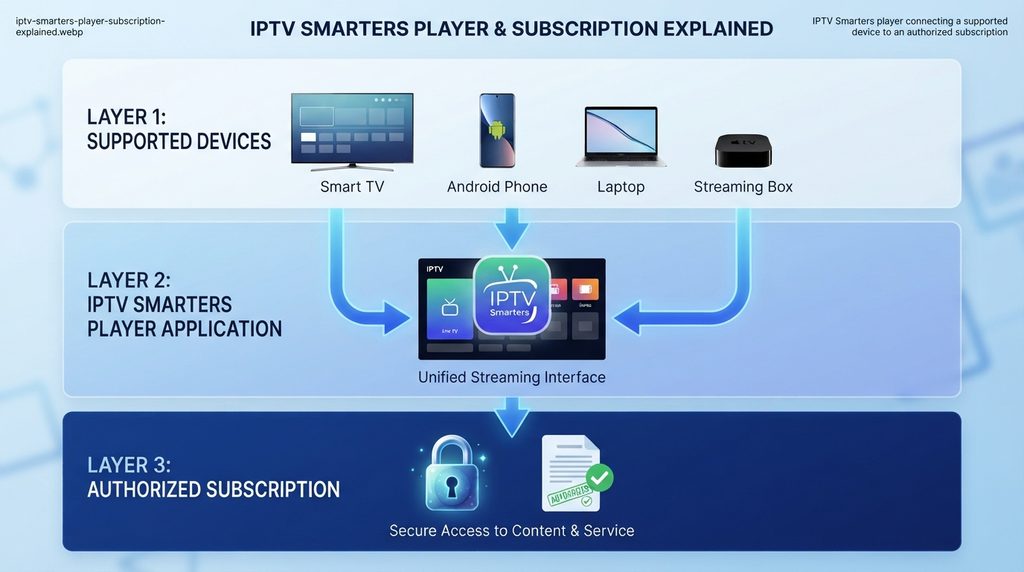
IPTV Smarters is an interface for organizing and playing media supplied by the user or a separate service. The official Smarters Pro terms state that the app does not provide, host, sell, or distribute channels or streaming subscriptions. That distinction explains why installing the app alone does not produce a channel list.
The player receives account or playlist information, organizes available live and on-demand sections, and sends a selected stream to the device’s playback engine. The content source, account status, guide data, and allowed connections come from the provider rather than the player.
The player and subscription are separate
Think of the setup as three connected layers:
- Device: Fire TV, Android/Google TV, Smart TV, Apple device, phone, tablet, or computer.
- Player: IPTV Smarters, Smarters Pro, Smarters Player Lite, or another compatible media player.
- Subscription or authorized playlist: The account that supplies the available media and login information.
Paying for a provider does not automatically unlock every premium feature in a third-party player. Paying for a player also does not buy channels. Check both products separately so you know what each payment covers.
What the app needs to work
The exact login screen varies by app version and platform. A compatible provider may supply a username, password, and server address, or it may supply an M3U-style playlist URL. Enter only the method and details provided with your account.
Never publish those credentials in a forum, comment, screenshot, or social post. Anyone with working account details may be able to use a connection included in your plan.
Is IPTV Smarters Legal and Safe?
The media player itself is a general-purpose tool; legality depends on the content source and your authorization to access it. Use IPTV Smarters only with personal media, licensed services, or content you are otherwise permitted to stream. An app name, VPN, playlist format, or payment method does not convert an unauthorized source into a lawful one.
The official Smarters Pro terms describe the software as a standalone player without preinstalled channels. A careful buyer should apply the same separation when evaluating any service advertised as an “IPTV Smarters subscription.”
Content authorization matters
IPTV is internet-based media delivery; the technology does not prove that a source has distribution rights. Before paying, verify the seller’s identity, policies, authorization, support route, billing description, and terms.
How to avoid imitation apps and unsafe downloads
Several apps use similar words, icons, and descriptions. Confirm the developer, listing details, privacy information, recent updates, and supported platform before installing anything. Prefer the official device store or a download path published by the app developer.
Do not install “cracked,” modified, or ad-free APK files from random forums. They may be outdated, altered, or bundled with unwanted software. Google, Apple, Amazon, Samsung, and LG each provide official app-installation routes for supported devices.
IPTV Smarters Features That Matter
Feature lists vary across Smarters versions and operating systems. Confirm the actual listing on your device instead of assuming that a feature shown on Android also exists on Samsung, LG, iOS, or tvOS.
Playlist and credential support
Smarters-type players are designed to load user-supplied media sources. Depending on the version, setup may use provider credentials, a server address, or a supported playlist format such as M3U. The login method must match what your provider supplies.
This flexibility can provide one familiar interface across devices, but the player displays only what the authorized source supplies.
Live TV, guide, favorites, and on-demand organization
A compatible configuration may organize live sections, movies, series, favorites, recently viewed items, and program-guide information. The player controls presentation; the source controls the underlying catalog and metadata.
An empty guide does not always mean the player is broken. The Electronic Program Guide, or EPG, may be missing, outdated, incorrectly mapped, or temporarily unavailable from the source. Refreshing data can help, but a provider-side guide problem requires provider support.
Device experience and performance limits
Picture quality depends on the source, provider delivery, device, display, network, and congestion. A “4K” label cannot guarantee 4K playback everywhere. For television use, choose a version designed for remote-control navigation.
IPTV Smarters Device Compatibility
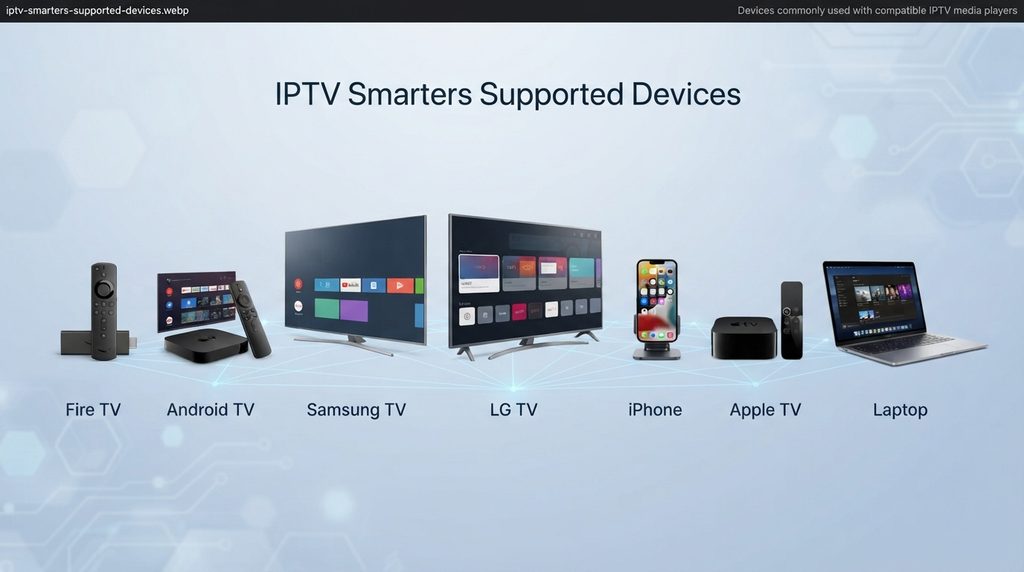
App availability changes by country, store, television model, and operating-system version. Search the official store on the actual device before buying a long subscription.
| Device platform | Installation path | What to verify |
|---|---|---|
| Fire TV | Amazon app search where available | Exact listing, Fire OS compatibility, remote navigation |
| Android TV or Google TV | Google Play on the TV | TV-optimized version and supported login method |
| Android phone or tablet | Google Play | Developer, permissions, screen layout |
| Samsung Smart TV | Samsung Apps | Model year, region, Tizen availability |
| LG Smart TV | LG Content Store | webOS version, country, listing availability |
| iPhone or iPad | Apple App Store | Exact app name, developer, supported playlist type |
| Apple TV | tvOS App Store | Native tvOS support and remote experience |
| Windows or macOS | Official developer/store route | Operating-system support and download source |
Fire TV and Android/Google TV
On Fire TV, use Find or Search and follow Amazon’s official Fire TV instructions. On Google TV, use the Apps tab described in Google’s Google TV app guide. If the exact app is absent, do not assume a phone APK is appropriate for a TV.
Samsung and LG Smart TVs
Samsung and LG televisions do not automatically use the same apps as Android TV. Samsung uses its Apps catalog, while LG uses the LG Content Store on supported webOS models.
App availability depends on platform, model, and region. Check the Samsung app instructions or LG app instructions for the current menu path.
iPhone, iPad, and Apple TV
Apple’s stores contain similarly named players, so review the developer and listing carefully. Smarters Player Lite states that it supplies no channels. Apple TV requires a tvOS-compatible listing installed through the Apple TV App Store.
Windows, macOS, and web access
Use the developer’s current website or an official operating-system store. Confirm login compatibility, use a trusted HTTPS address, and never enter credentials on a page reached through an unverified ad or message.
What You Need Before Setup
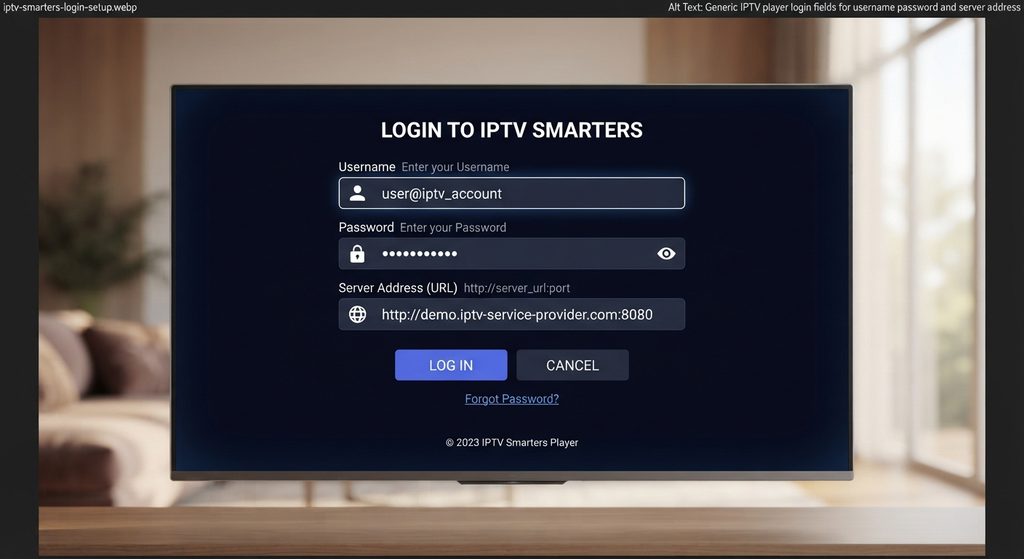
Prepare the following items before opening IPTV Smarters:
- A supported device with current system software
- A compatible app installed from a trusted source
- Valid subscription or playlist information
- The correct username, password, and server address when required
- A stable internet connection
- Enough simultaneous connections for the household
- Access to the provider’s setup and support pages
Subscription credentials
Copy credentials exactly. A missing character, slash, protocol, capitalization change, or pasted space can prevent login. Keep the activation message private until setup works.
Correct connection count
A connection normally means one stream playing at a time, not the number of saved devices. Confirm the provider’s exact policy.
If two people regularly watch different programs simultaneously, select at least two simultaneous connections. Opening extra streams beyond the plan limit can cause login errors, stopped playback, or account restrictions.
Stable network and supported device
Ethernet is usually the cleanest option for a stationary device. Wi-Fi performance depends on distance, walls, interference, and household traffic. Update the device and app; low storage or old firmware can resemble a provider outage.
How to Set Up IPTV Smarters
Install a verified Smarters player on a supported device, choose the login method supplied by your provider, enter the credentials exactly, and allow the first synchronization to finish. If the account does not load, check typing, subscription status, connection limits, and provider availability before reinstalling the app.
General setup steps
- Check compatibility. Confirm that a suitable Smarters player exists in your device’s official store.
- Install the app. Verify the developer and listing before downloading.
- Open the account screen. Look for an option such as Add User, Add Playlist, or Login.
- Choose the matching method. Use the credential or playlist option specified by your provider.
- Enter the details. Type the username, password, and server or playlist address without extra spaces.
- Save the profile. Use a simple household label that does not reveal the password.
- Wait for synchronization. Large catalogs and guide data can take time to load initially.
- Test several sections. Check live playback, on-demand categories, audio, and guide data.
- Secure the account. Remove any temporary screenshots containing credentials.
The Digital Lizard IPTV setup guide provides separate paths for Smart TV, Fire TV, Android, and Apple TV. Use the device-specific section because menu names and app availability differ.
IPTV Smarters setup on Fire TV
Connect Fire TV, open Search, and install a verified compatible player. If it is unavailable, use another store-listed option rather than an unknown APK.
IPTV Smarters setup on Android or Google TV
Open Google Play and select a TV-compatible player. Add the profile with the supplied credentials and let the catalog load; mobile and TV editions may differ.
IPTV Smarters setup on Samsung or LG TV
Open Samsung Apps or the LG Content Store and install a player supporting the TV model and login method. Android software does not run natively on Tizen or webOS.
IPTV Smarters setup on Apple devices
Search the App Store, verify the developer, supported devices, privacy label, and purchase details, then install the correct version and add the provider-supplied source.
IPTV Smarters Pricing Explained
There are two possible costs: the player and the content subscription. A player may be free, paid once, supported by in-app purchases, or offered in free and premium editions. The provider separately charges for service duration and simultaneous connections.
This distinction prevents a common checkout mistake. “IPTV Smarters pricing” can refer to an app upgrade, a provider subscription compatible with the app, or both.
Digital Lizard IPTV one-connection plan comparison
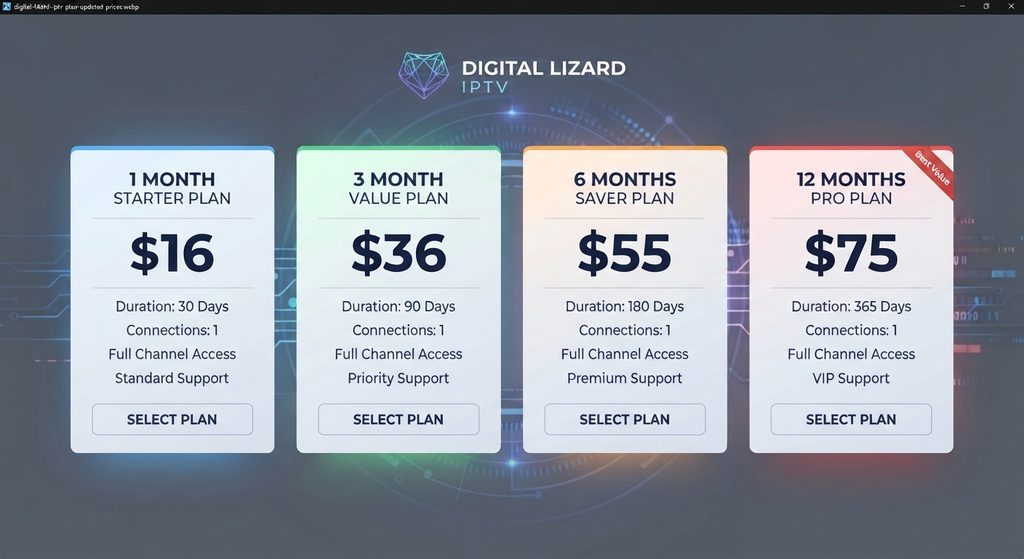
The following prices were published by Digital Lizard IPTV for one simultaneous connection at the time of research. Verify the live total on the pricing page before paying because prices and availability can change.
| Duration | Total price | Effective monthly cost | Best suited to |
| 1 month | $16 | $16.00 | Compatibility testing and short commitment |
| 3 months | $36 | $12.00 | Users who want moderate commitment |
| 6 months | $55 | About $9.17 | Established users seeking fewer renewals |
| 12 months | $75 | $6.25 | Users who have already confirmed device and service fit |
The site offers one to five connections. The final total depends on count and duration, so use the current checkout rather than estimating it.
Choosing the right duration
Start with a shorter term when you have not confirmed app availability, network performance, desired categories, or support quality. A lower monthly equivalent on a longer plan matters only if the service fits your devices and household.
Before selecting a longer plan, read the refund policy, confirm simultaneous connections, and test the intended device and network.
How to Choose a Compatible IPTV Smarters Subscription
The best compatible subscription is the one that clearly documents device support, login format, connection limits, current pricing, delivery, support, and refund conditions. A huge unverified catalog claim is less useful than a service that works reliably with the content you are authorized to access.
Compatibility and activation
Confirm that the provider supplies a supported login method, explains activation, and offers a clear support route before paying.
Digital Lizard states that it supplies activation details and setup guidance for compatible applications. Review the subscription checkout only after confirming the device and plan.
Simultaneous connections
Count simultaneous streams. A household with three devices may need only one connection if just one plays at a time, while simultaneous viewers require additional connections.
Do not confuse installation count, profile count, and simultaneous-stream count. Read the provider’s wording and ask support when the limit is unclear.
Support, policies, and payment clarity
A useful support system asks for the device model, app name, login method, error message, and troubleshooting already attempted. It should not ask you to publish a password or full card number.
Before checkout, verify:
- Final price and billing currency
- One-time versus recurring payment
- Subscription duration
- Number of simultaneous connections
- App or player costs not included in the service price
- Activation and delivery method
- Refund request period and conditions
- Support contact route
- Content and regional availability
IPTV Smarters Pros and Cons
| Pros | Cons |
| Familiar interface across several platforms | App names and features can differ by store |
| Supports common provider and playlist workflows | Provides no channels by itself |
| Can organize live, guide, and on-demand sections | EPG quality depends on source data |
| Suitable for beginners when credentials are supplied clearly | TV, mobile, and desktop versions may behave differently |
| Makes it easy to switch compatible sources without changing the device | Performance still depends on stream, hardware, and network |
IPTV Smarters is strongest as a flexible front end. It is not a cure for an expired account, overloaded source, weak Wi-Fi signal, missing guide data, or insufficient connection count.
IPTV Smarters Versus Alternative Players
No player is best for every device. Smarters-type apps offer familiar live and on-demand organization, while alternatives may provide a different guide, remote experience, customization level, or price.
Compare players using practical criteria rather than brand popularity:
| Criterion | What to compare |
| Platform | Native support for your exact device and region |
| Login | Compatibility with the source format supplied |
| Interface | Remote, touch, or mouse usability |
| Guide | EPG refresh, time zone, favorites, and category control |
| Playback | Decoder options and performance on your hardware |
| Cost | Free features, premium upgrade, and renewal model |
| Privacy | Developer identity, permissions, and policy |
| Support | Update history and official help route |
Use the best IPTV player comparison for a wider framework. Test only verified options.
Common IPTV Smarters Problems and Fixes
Login failed or authorization error
Re-enter the username, password, and server address manually. Remove spaces, check capitalization, and confirm that the subscription is active. Make sure the selected login method matches the details supplied.
If credentials fail everywhere, contact the provider. If they work elsewhere, update or reinstall the affected app after saving the account details privately.
Categories are empty or the EPG is missing
Allow the first synchronization to complete, then use the app’s refresh option if available. Check the device date, time, and time zone because incorrect settings can shift guide entries.
The player cannot create guide data the source does not supply. Report persistent gaps with the device, app version, and start time.
Playback buffers or freezes
Test another channel or authorized item first. If one stream fails but others work, the problem is unlikely to be the entire app. If everything buffers, restart the player, device, router, and modem.
Test Ethernet or stronger Wi-Fi, stop large downloads, close unused apps, and compare another device to separate source, network, and hardware problems.
The app crashes or will not open
Restart the device, update its system software, update the player, and check free storage. On platforms that provide a cache control, clear the app cache before deleting stored data.
Secure the login details before reinstalling because deletion may remove profiles.
The app is not available in the store
Availability can vary by country, device model, operating system, and store policy. Confirm that the device region and software are correct, then use a different compatible player from the official store if necessary.
Use a verified alternative that supports the same authorized login format instead of a random download page.
Common Buying and Setup Mistakes
- Buying before checking the app store: Search from the real device first.
- Assuming the app includes content: IPTV Smarters is a player; the source is separate.
- Choosing one connection for simultaneous viewers: Count streams, not owned devices.
- Buying a year immediately: Confirm device, network, catalog, and support on a shorter commitment when uncertain.
- Trusting unverified channel or quality claims: Availability and resolution can change by source.
- Entering credentials into an imitation app: Verify the developer and download route.
- Sharing credentials publicly: Treat them like a password.
- Blaming every failure on the app: Separate device, network, provider, account, and guide-data problems.
- Ignoring refund terms: Read the current policy before purchase.
- Assuming a VPN fixes legality or quality: It does neither automatically.
Who IPTV Smarters Is Best For
IPTV Smarters suits users with an authorized compatible source who want a recognizable interface. It may not suit users expecting included channels, requiring a specialized guide workflow, or lacking a verified version for their device.
FAQ
IPTV Smarters FAQ
Does IPTV Smarters include channels?
No. IPTV Smarters is a media player and does not include a channel package. You must add an authorized playlist or valid credentials from a separate compatible service.
Is IPTV Smarters free?
Cost depends on the exact app, platform, and version. Some listings are free, while others may include purchases or premium options. A content subscription is charged separately.
What login information does IPTV Smarters need?
It may require a username, password, server address, or supported playlist URL. Use only the method supplied by your provider and keep every credential private.
Can I use IPTV Smarters on Fire TV Stick?
You can use a compatible Smarters-type player if it is available for the Fire TV model and region. Search through the Amazon interface and verify the listing before installation.
Can I use IPTV Smarters on Samsung or LG Smart TV?
Compatibility depends on the model, year, region, Tizen or webOS version, and current app-store catalog. Search the television’s official store before purchasing a subscription.
Why does IPTV Smarters show invalid credentials?
Common causes include typing errors, extra spaces, wrong capitalization, an incorrect server address, an expired account, a mismatched login method, or too many active streams. Verify each item before reinstalling.
Why is the IPTV Smarters program guide empty?
The guide may still be loading, need a refresh, use the wrong time zone, or lack source data. If refreshing and correcting device time do not help, contact the provider.
How many devices can use one subscription?
That depends on the purchased simultaneous-connection count and provider rules. Installation on several devices does not necessarily allow them to stream at the same time.
Should I buy a one-month or annual plan?
Choose one month when compatibility, performance, or content fit is unconfirmed. Consider a longer plan only after testing the intended device and reviewing the current price and refund conditions.
Is IPTV Smarters the same as an IPTV provider?
No. The player displays content from a separate authorized source. The provider controls the account, catalog, connection limit, guide data, and subscription terms.
Final Decision
IPTV Smarters is a practical player when you understand what it does and what it does not do. Confirm the exact app listing, device support, login format, simultaneous connections, source authorization, and refund conditions before committing to a plan.
For Digital Lizard IPTV, compare the current plans and pricing, verify your device in the setup guide, and then use the subscription page for the matching connection count and duration. The right next step is compatibility first, price second, and checkout last.