
An IPTV subscription 12 months UK can appeal to households that want a full year of internet-delivered television without renewing every few weeks. The annual headline price, however, is only one part of a sensible decision. Before committing, check the content rights, the number of screens that can play at the same time, the application required for your television, the payment currency, and the refund conditions.
Digital Lizard IPTV currently advertises a 12-month, one-connection plan for US$75, equivalent to US$6.25 per month when its upfront price is divided by twelve. Its website is primarily US-focused and prices the published base plans in dollars. UK-specific availability, content distribution permissions and a GBP checkout total have not been independently confirmed for this article. British customers should request those details in writing rather than assume that a US-advertised plan is a UK-licensed package.
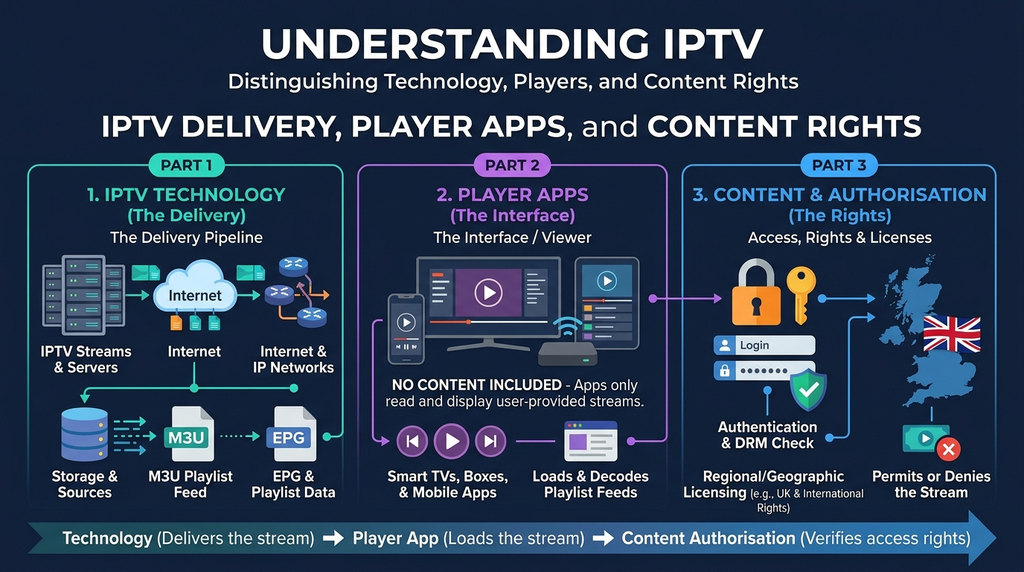
This guide explains how annual IPTV plans work, how to compare the real commitment, and what to verify before you pay.
Table of Contents
Table of Contents
Quick answer: Is IPTV subscription 12 months UK worth it?
A 12-month plan can make financial sense after you have tested the service on your own network and confirmed the provider is authorised to distribute the programming you intend to watch in the UK. The price per month is generally lower than short prepaid periods, but the payment is usually made upfront. If this is your first time using a provider, a shorter plan may be the safer way to verify compatibility, support and performance.
What does a 12-month IPTV subscription include?
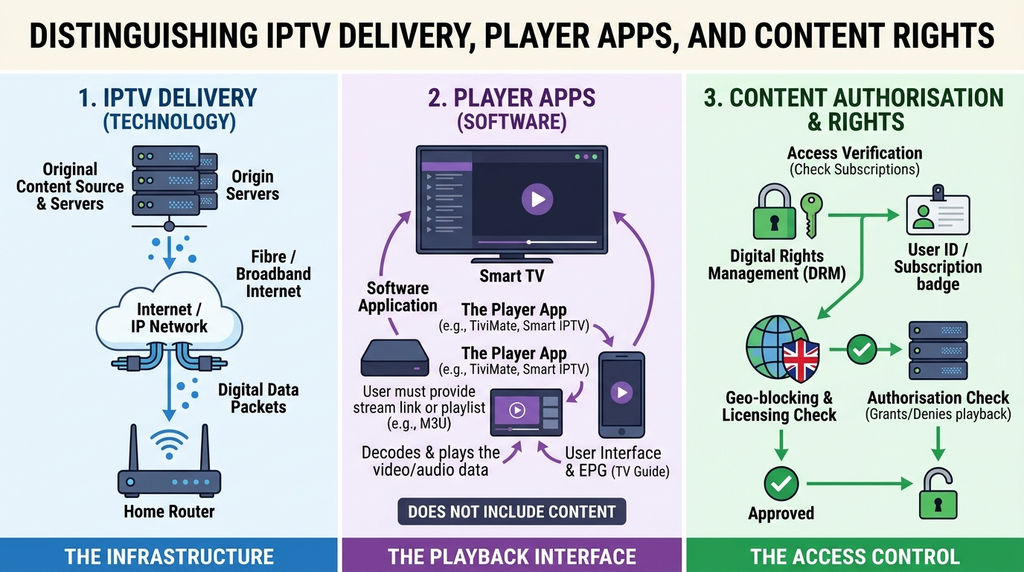
A 12-month IPTV subscription generally allows access to a provider’s internet-delivered service for a stated annual term. It is different from owning a television, buying an IPTV player application, or paying for a TV Licence. The service, the app used to display it and the rights to the actual programmes are separate things.
Internet Protocol Television (IPTV) describes delivering television content over internet networks. UK regulator Ofcom explains IPTV as TV channels delivered through the internet. This delivery method can be used by legitimate broadcasters and authorised subscription services; the technology itself is not proof that any particular channel package is authorised.
A useful annual-plan description should specify:
- Duration: the start or activation date and when the 12 months expire.
- Simultaneous connections: how many separate streams may play at once.
- Content coverage: the exact channels or programmes the provider has rights to supply in your location.
- Picture and sound: whether the streams you care about are available in SD, HD, Full HD or 4K, and on what devices.
- Player compatibility: whether your device supports a suitable app and login method.
- Guide and playback features: which channels support an electronic programme guide (EPG), catch-up or other functions.
- Support and refunds: how customers obtain help and which written conditions apply.
Avoid judging a service by its claimed total number of channels. A smaller, relevant, rights-cleared lineup that works on your actual television is more useful than an inflated count of unavailable, duplicated or poorly labelled entries.
An IPTV player is not the same as an IPTV subscription
A player is software that can display a compatible, legitimately supplied playlist or account. A subscription is an agreement for access to a provider’s service. Installing a player does not, by itself, give you permission to watch subscription sports, premium films or pay-TV channels. Some players charge a separate app fee. Check the player’s own terms rather than assume every app is included with the service.
Digital Lizard IPTV: published prices and the annual calculation
Digital Lizard’s published pricing page lists the following one-connection offers. These are the amounts displayed at the time of this review on 17 November 2026, not independently confirmed checkout quotes for the UK.
| Prepaid duration | Published total (USD) | Equivalent per month (USD) | Main trade-off |
|---|---|---|---|
| 1 month | $16 | $16.00 | Lowest initial commitment |
| 3 months | $36 | $12.00 | More time to assess regular use |
| 6 months | $55 | $9.17 | Lower monthly equivalent, greater prepayment |
| 12 months | $75 | $6.25 | Lowest published monthly equivalent, longest commitment |
The monthly figures are arithmetic comparisons, not a promise of monthly billing. The annual plan’s total is shown as a one-time order. At the displayed prices, twelve separate one-month purchases would total $192, compared with $75 for one year. That is a difference of $117, assuming the same prices remained in force, the same single connection was purchased and service conditions remained equivalent. It is not a guarantee of future savings, service continuity or future prices.
For customers in Britain, these prices carry three practical cautions. First, the website publishes dollars rather than a verified sterling tariff. Second, your bank or payment provider may apply currency conversion charges. Third, the plan’s actual accessibility and distribution rights in the UK require separate confirmation. Do not advertise US$75 as a fixed £ price.
What about two or more screens?
Digital Lizard’s homepage displays choices from one to five simultaneous connections, but the standard pricing page above lists only the one-connection totals. The multi-connection annual prices can vary with the selection. A household planning to use two televisions at the same time should request the exact two-connection 12-month checkout total instead of multiplying or guessing from the single-screen figure.
A connection usually refers to simultaneous playback, not the number of apps installed. For instance, you might have a player installed on a living-room TV and a phone yet use only one stream at a time. Conversely, two people watching different programmes simultaneously normally need two permitted streams. Ask whether the provider also restricts device changes, separate household locations or network addresses.
Annual versus monthly, quarterly and six-month plans
Longer plans offer less frequent renewals and may lower the average cost per month, while shorter commitments limit what you have at risk if the service is unsuitable. There is no universally correct duration.
| Situation | Duration worth considering | Why |
|---|---|---|
| You have never used the provider | 1 month, after any verified test | Check setup, stability and support before paying for a year |
| You need access for a limited period | 1 or 3 months | Avoid paying for months you will not use |
| You have used it reliably for several months | 6 or 12 months | Potentially lower monthly equivalent |
| Several people watch simultaneously | Confirm the connection count first | A cheaper one-screen plan may not fit the household |
| You need particular licensed sports or premium content | Verify UK rights before choosing any term | Price cannot replace permission to distribute a broadcast |
When a year is a reasonable choice
An annual option is more defensible when you know the app works on your actual device, the supplier has confirmed its UK distribution rights for your required content, the service has proved usable during busy times, the refund policy is acceptable and you can afford the entire upfront payment. It can be convenient to avoid repeated billing administration, but convenience is not a reliability guarantee.
When a shorter commitment is better
Choose flexibility if your broadband is unreliable, you are using an older TV, you frequently travel, or the provider cannot explain its content authorisation and terms. A test performed on a smartphone alone may tell you little about a different player on a Samsung television. Changing internet providers, moving home, replacing your streaming box or changing a third-party app can also affect the experience during a year.
UK buying checklist: ten questions to answer
Before a 12-month payment, use this checklist as a practical decision framework. A supplier should be able to answer the key questions plainly and in writing.
1. Is the content licensed for viewers in the UK?
Ask who has the right to supply the channels, films and sports content you intend to view in Britain. Do not assume that a catalogue showing a well-known broadcaster’s logo proves a commercial distribution agreement. If a service cannot substantiate relevant rights, do not buy it as a source of that protected content.
2. What is the complete upfront payment?
Confirm the currency, selected term, connection count, taxes if applicable, app charges and any conversion or transaction fees. A monthly equivalent is only a comparison; the contract may require the whole sum immediately.
3. How many streams can play together?
Count simultaneous viewers, not merely screens in the house. Ask whether watching on a mobile connection while someone uses the living-room TV counts as a second stream. Do not assume separate locations are permitted.
4. Which exact device and player are supported?
Identify the full model and software version of your Fire TV, Android TV, Samsung, LG, Apple TV or computer. Make sure a legitimate, compatible player is available. App-store listings, login options and software features vary.
5. Will the specific programmes you want be available legally?
Send a list of must-have categories, languages or programmes and ask for written confirmation of both availability and UK rights. Do not infer a specific football or premium sports package from the generic label “sports”.
6. Can you verify quality on your network?
A promotional “4K” badge is not a guarantee that every source is native 4K. Actual playback depends on content encoding, available bitrate, the TV, app, home network and provider capacity. Test the streams you would genuinely use rather than a single demonstration clip.
7. Is an EPG or catch-up feature really included?
An electronic programme guide can make live viewing easier, but coverage is source-dependent. Catch-up and recordings have separate rights and technical requirements. Ask which named channels support these features and for how long.
8. How do cancellation and refunds work?
Read the Digital Lizard refund policy before paying. The published page states a three-day period for submitting a refund request, subject to the policy’s conditions and review. This does not mean an unconditional three-day money-back promise or a refund for every problem later in the subscription. Ask what happens if availability changes during the rest of the annual term.
9. Is help available through a documented channel?
Check whether you can reach support and receive an answer about your particular device. A practical support response should distinguish a login problem from an app compatibility issue or broadband problem. Keep a copy of purchase and policy details, without publishing credentials.
10. What happens at expiry?
Ask when the subscription starts, how renewal works, whether your account configuration can be retained and whether you will have to pay a different future tariff. Do not assume the agreement renews automatically or that future prices will match today’s offer.
Which devices can you use?
The Digital Lizard setup guide provides instructions for several common device families. Availability of a suitable player is determined by the device manufacturer, operating system and application store, so consider the following table a preparation guide rather than a guarantee for every model.
| Device | What to verify | Common point of confusion |
|---|---|---|
| Amazon Fire TV / Fire TV Stick | Fire OS version, available app, remote-friendly controls | A player app may not appear in the regional Appstore |
| Android TV / Google TV | Google Play listing, TV-compatible interface, supported login | Mobile apps do not always work well with a TV remote |
| Samsung Smart TV | Tizen model/year and TV app-store availability | Samsung Tizen is not Android TV |
| LG Smart TV | webOS version and compatible app | Apps vary by model and region |
| Apple TV | tvOS app availability and supported account format | An iPhone app does not necessarily have a tvOS version |
| Android phone or tablet | Supported app and private account setup | A successful phone test does not prove TV compatibility |
| Windows or Mac | Compatible legitimate player and network access | Different players may support different input formats |
| Roku | Verified official Roku-channel availability for the precise setup | Do not assume an Android IPTV app installs on Roku |
Fire TV and Android TV
On Fire TV, search the official Appstore for an appropriate player and check compatibility before downloading. Amazon provides instructions for installing apps on Fire TV. On Android TV or Google TV, check Google Play for a TV-compatible version of the application. Avoid downloading random APK files from unknown sites; they may pose security or privacy risks.
Samsung and LG Smart TVs
A television being “smart” does not ensure that a particular IPTV player exists for its operating system. Check the manufacturer-supported app store and your exact model. If the app is unavailable, a supported external streaming device may be an option, but that is an additional purchase and should not be treated as part of a plan without verification.
Apple TV, phones and computers
For Apple TV, use a tvOS-compatible app that accepts the authorised subscription’s login method. Phones and computers can help distinguish a device-specific failure from a general account issue, but permitted simultaneous streams still apply. Never share a login screenshot publicly or send the password to a third-party forum.
How fast should your broadband be?
There is no verified speed benchmark for every Digital Lizard stream in every location. Requirements differ according to the source, encoding, resolution, app and network conditions. For general context, Netflix lists 15 Mbps or higher for its 4K streams, while YouTube recommends sustained 20 Mbps for 4K UHD viewing. Those are examples from other services, not tested minimums or guarantees for this subscription.
For an annual IPTV decision, focus on sustained speed at the device, especially during your normal evening viewing time. A fast result near the router does not guarantee a strong connection behind a television. Recheck when several household members are streaming, gaming or making video calls.
Ethernet can help reduce Wi-Fi variability. Where cabling is impractical, place the router sensibly, minimise interference, and choose an appropriate Wi-Fi band for the distance and walls involved. A fast internet package will not correct a faulty source stream, application crash or unauthorised content distribution.
How to test fairly
- Run a speed test near or on the actual viewing device during a typical busy period.
- Compare playback using another authorised, reliable streaming application.
- Test one permitted stream first; then test simultaneous viewing only if the plan allows it.
- Monitor audio synchronisation, buffering, guide loading and remote-control responsiveness.
- Record the app version, device model and precise time if there is a problem.
- Retest with Ethernet or a stronger Wi-Fi signal before blaming the provider or broadband company.
How to assess a service before paying for a year
A structured test is more informative than a brief impression. If the provider currently offers a legitimate trial or one-month option, establish what is included and whether it uses the same infrastructure and content rights as the proposed annual plan. Digital Lizard’s current site does not establish that a free 24-hour trial is guaranteed for every customer; availability should be confirmed directly.
Use a small written scorecard:
| Check | Evidence to collect | Pass condition you choose |
|---|---|---|
| Rights | Written statement or documentation of relevant UK authorisation | Content you need is appropriately licensed |
| Checkout | Final amount and currency screenshot | No unexpected add-ons or fees |
| Device | Working player on your actual TV | Navigation, login and playback function |
| Peak-time performance | Results from evenings and weekends | Meets your household’s expectations |
| Connections | Correct number of concurrent streams | All authorised screens work together |
| Support | Response to a genuine test question | Clear and usable assistance |
| Refund terms | Saved copy of applicable written policy | Acceptable risk for the full annual payment |
A scorecard gives you an original, repeatable decision method rather than relying on an unverified “best IPTV” ranking. If even one essential requirement—especially content rights or transparent payment terms—is missing, postpone the annual commitment.
How to review a Digital Lizard IPTV order
If you decide to investigate the offer, follow a verification-first order process rather than rushing to payment:
- Visit the pricing plans page and review the published one-connection durations.
- Confirm UK service availability and content rights with support for the exact programming you wish to access. The main site is US-focused.
- Check the FAQ page for explanations of simultaneous connections, setup and current terms.
- Review the terms and conditions and the refund policy before selecting a long commitment.
- If you proceed, review the selected device count, duration, final currency and total on the subscription order page. Do not assume the default displayed order is the annual configuration.
- Save the receipt, policy version and any written explanation of UK eligibility. Use an appropriate secure payment method and avoid transmitting full payment details in chat messages.
- After legitimate activation, use only the approved account details and install a compatible player from a trusted source.
A purchase confirmation should state what you actually bought. If the website’s plan selector and the payment form show different totals or configurations, resolve that discrepancy before paying.
Troubleshooting common IPTV problems
Even after a successful installation, a problem can arise from the player, credentials, network, device or source. Diagnose the issue in a simple order instead of reinstalling everything immediately.
The player says the login is invalid
Check that you entered the right username, password and server information in the matching fields. Watch for copied spaces, mismatched characters and incorrect login types. Confirm the subscription is active. If the details still fail, contact the provider through its documented channel; do not post the full credentials online.
Live channels keep buffering
Test a different authorised channel or stream, then another legitimate streaming app. Restart the device and router, reduce concurrent downloads, and try Ethernet if possible. If only one source buffers while other apps are stable, record the affected category and time for support. Do not assume that a VPN will solve every problem or make an unauthorised stream lawful.
It works on a phone but not the television
That pattern suggests—but does not prove—a device, player, format or network difference. Check whether the TV uses a different app edition, whether its software is current, and whether the chosen connection count allows your test. Try the TV on another suitable network only if it is permitted by your account terms.
The TV app is missing from the store
Confirm the exact OS and model. Tizen, webOS, Fire OS, Android TV and tvOS have different application ecosystems. Search the manufacturer’s official store and consult the device setup guide. Do not pay for a year expecting a particular app to appear without checking.
The EPG is empty or favourites will not save
Check whether the chosen player has guide and favourites features, whether the account data has finished synchronising, and whether the app stores favourites locally. Some features depend on the app edition or source. Restart the player and check official app guidance before clearing data, because resetting an app may remove personal settings.
How to ask for useful help
The Digital Lizard contact page requests an order reference, device model, app name, error details and timing. Include these facts without publishing your password, full payment card number or sensitive account URLs. Verify that its contact form is functioning before relying on it as your only support route.
Is IPTV legal in the UK?
IPTV technology is legal; access to copyrighted programming requires the necessary rights and permissions. The UK government’s guidance on illicit streaming devices explains the distinction between lawful streaming equipment and its use for unauthorised content. A Fire TV Stick, Android device or IPTV player is not inherently unlawful. A provider does not acquire premium broadcast rights just because it can technically deliver a stream.
This distinction matters particularly for annual offers. A bundle claiming access to numerous subscription-only channels or expensive sports rights for a very low price deserves careful verification. You should check the provider’s rights for each relevant market, not infer legitimacy from attractive pricing, a secure-looking checkout or a mention of copyright on a legal page.
A UK TV Licence is a separate requirement. According to TV Licensing’s guidance, you generally need to be covered by a TV Licence to watch or record live television on any channel or streaming service, or to use BBC iPlayer. A TV Licence does not grant an IPTV reseller distribution rights, and a provider’s subscription does not replace a TV Licence where one is legally required.
If you cannot verify content authorisation, choose a licensed broadcaster or streaming platform for that programming. Avoid tools or instructions that promise to bypass restrictions on content you are not entitled to watch.
Frequently asked questions
How much is a 12-month IPTV subscription in the UK?
Prices vary by supplier, licence rights, number of simultaneous streams, terms and currency. Digital Lizard currently lists US$75 for 12 months with one connection, but that is a dollar-denominated published offer, not a confirmed GBP quote or confirmation of UK availability. Check the full checkout amount, currency conversion and UK rights before paying.
Is a 12-month plan cheaper than paying each month?
It can be. At Digital Lizard’s currently published one-connection base prices, twelve individual $16 months would cost $192 versus $75 for the annual offer. That illustrative $117 difference depends on unchanged prices and equivalent plan conditions. It does not eliminate the risk of paying a full year upfront.
Can I use a 12-month IPTV subscription on two TVs?
You can generally use two compatible TVs if the subscription permits two simultaneous connections and the supplier’s terms allow your household configuration. A one-connection plan should not be assumed to permit both TVs streaming at once. Ask for a verified two-connection total and any location restrictions.
Does IPTV Smarters Pro or another player come with the subscription?
Not necessarily. A player and a content subscription are separate products or services. App availability, extra premium features and fees depend on the player and device. Verify the specific app’s source and charges, and do not assume its installation includes programme rights.
Is a free trial available before I buy 12 months?
Some suppliers offer trials, while others provide a short paid option. Digital Lizard’s current homepage says trial availability and pricing can change; a guaranteed free trial has not been verified. Confirm the active trial offer and its scope directly before relying on it.
Will every channel be in 4K?
No such guarantee has been established. Resolution depends on the content source, the actual stream, the device, display, player and internet connection. Test the specific programmes you watch rather than treating “4K supported” as meaning every programme is native 4K.
What happens if the service stops working during the year?
Collect the error and device details, troubleshoot your connection and contact support. Refund eligibility depends on applicable written terms. Digital Lizard’s published refund-request window is three days, subject to review; it should not be described as a blanket right to reclaim the full annual charge at any time.
Do I need a TV Licence for IPTV in Britain?
A TV Licence is generally needed for watching or recording live television on TV channels or streaming services and for using BBC iPlayer. On-demand use outside BBC iPlayer has different rules. Consult the official TV Licensing guidance for your circumstances. It is a separate question from whether an IPTV provider has content-distribution permission.
Final decision
If you are comparing an IPTV subscription for 12 months in the UK, prioritise verifiable rights, the correct simultaneous connection count, working device support, clear terms and the full annual payment ahead of promotional claims. Digital Lizard’s publicly displayed single-connection yearly amount is US$75, but its current pages do not by themselves establish a UK-licensed content catalogue or a sterling checkout price.
Next step: Review the published plans, then obtain written confirmation of UK availability and distribution authorisation for your required content before placing an annual order. If those essentials cannot be verified, do not proceed on price alone.