
Buying an IPTV account is not simply a matter of selecting the cheapest subscription. UK customers should understand what the account provides, which devices can use it, how many streams it permits at once, and what happens after payment. They should also verify that the provider is authorised to distribute the content they want to watch in their location.
If you want to buy IPTV account access through Digital Lizard IPTV, start by comparing the published subscription plans, then review device setup requirements and the applicable terms before placing an order. This guide explains the practical decisions involved without assuming that every channel, app or subscription is available on every UK device.
Quick answer: Choose an account by checking its legitimate content rights, subscription duration, simultaneous-connection allowance, supported player and login method, total checkout cost, refund conditions and support contact. A player app alone does not provide a television subscription. Never buy an account on the strength of an unsupported channel list or a claim of guaranteed uninterrupted streaming.
Table of Contents
Table of Contents
What Is an IPTV Account?
An IPTV account is a set of access details associated with a subscription to television or video content delivered over an internet connection. Depending on the service and player, the provider may supply a username, password and server address, or a supported playlist or activation method. The exact format varies; not every player accepts every account type.
Three separate components determine whether a setup works:
- The subscription: Defines what the customer has paid to access, where that content may be viewed, the period of access and the permitted number of simultaneous streams.
- The player: The app or software that reads a compatible account or playlist and presents the material on screen. A player is not proof of distribution rights and generally does not supply licensed content by itself.
- The device and internet connection: The television, streaming stick, mobile device or computer that runs the player and retrieves the stream.
This distinction matters when a buyer sees an app advertising IPTV compatibility. Installing an app does not automatically activate a paid account or guarantee that the app will work with any particular provider.
How to Choose an IPTV Account in the UK
A good purchase decision starts with what the household actually needs, rather than with a headline channel count.
1. Define the viewing requirements
Write down the programmes or categories that matter, the devices you plan to use, and whether multiple people will be watching simultaneously. Ask the seller to confirm content availability and the rights to provide that content in the UK. A provider should not treat technical accessibility as proof that it is authorised to distribute a programme.
2. Check simultaneous streams
Many households own several devices but use only one at a time. In that situation a single concurrent connection may be enough, subject to the provider’s device-switching rules. Two people watching independently at once generally require two permitted streams. Confirm the exact interpretation in the plan terms before ordering.
3. Confirm the login format
Ask which account details will be delivered and which supported players accept them. Some IPTV players use server URL, username and password fields; others use playlists or app-specific activation. The correct method depends on the specific service.
4. Compare the full purchase price
A lower average cost per month may mean a larger prepaid commitment. Calculate the total amount charged, the term of service, whether app fees are separate, and any currency conversion or payment fees. Do not assume that a US-dollar price is a guaranteed sterling total.
5. Review support, renewal and refunds
Read the written policy for account delivery, renewals, cancellation and eligible refund requests. Save a copy of the checkout confirmation and know which support channel to use if login fails.
Digital Lizard IPTV Account Prices
Digital Lizard IPTV currently publishes the following one-simultaneous-connection subscription options on its pricing page. These are advertised totals, not independently confirmed UK checkout prices.
| Subscription length | Published total (USD) | Monthly equivalent (USD) | Simultaneous streams in listed price |
|---|---|---|---|
| 1 month | $16 | $16.00 | 1 |
| 3 months | $36 | $12.00 | 1 |
| 6 months | $55 | $9.17 | 1 |
| 12 months | $75 | $6.25 | 1 |
Important: The monthly equivalents are arithmetic comparisons only, not monthly instalment offers. Pricing is subject to change. The website also refers to one to five simultaneous connections, but the table above does not establish prices for two to five connections. Confirm the exact total at checkout.
A shorter term may suit someone who is still testing whether their permitted content, device and network work as expected. A longer prepaid term represents a larger commitment and should only be considered after the relevant conditions are clear.
Compare current choices: View Digital Lizard IPTV plans and pricing.
One Connection or Several?
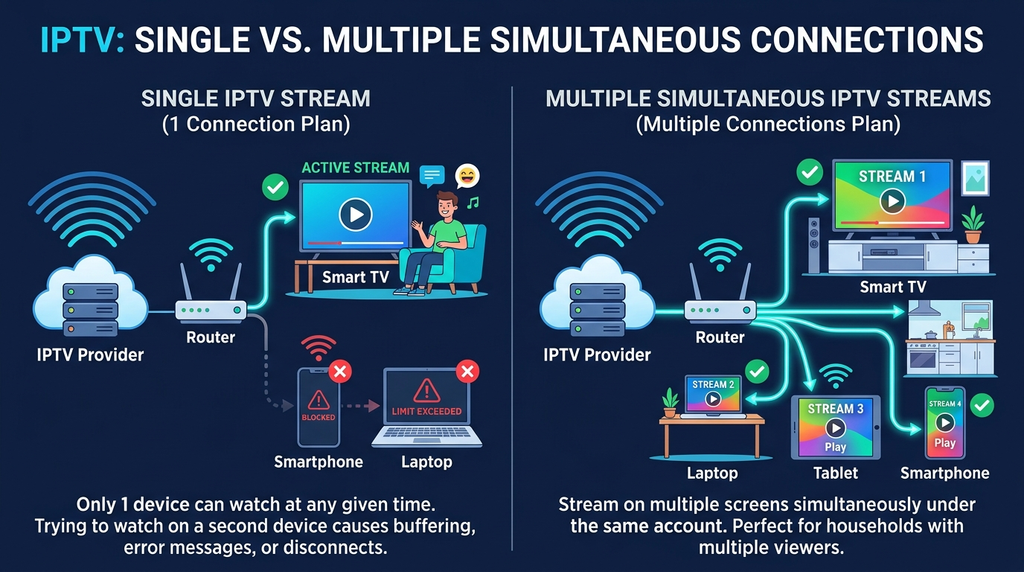
A connection allowance is usually about simultaneous playback, not simply the number of physical screens owned. Consider these examples:
| Household situation | Likely concurrent-stream need | What to verify |
|---|---|---|
| One person switches between TV and phone | 1 | Whether switching devices is permitted |
| Two people watch on separate televisions at once | 2 | Whether the selected plan allows two concurrent streams |
| Three family members watch at the same time | 3 | Player compatibility and plan limits |
| Five devices installed but only one is playing | Potentially 1 | Device limits and activation policies |
Do not assume that buying an extra connection automatically guarantees a specific performance level. Broadband quality, wireless conditions and source availability remain relevant.
Compatible Devices and Players
Digital Lizard IPTV’s published setup guide covers various device families. The key requirement is finding an appropriate player for the operating system and account format.
Amazon Fire TV Stick
Connect your Fire TV device to the internet, update the device where necessary and use a compatible player from a trusted source. Confirm whether the player accepts the login information provided with your subscription. Menus and app availability can differ across models and Fire OS versions.
Android TV, Google TV and Android phones
Check the Google Play listing for a compatible player on your particular device. A phone app may not provide an equally suitable remote-control experience on a television. Verify the login method before committing to a longer subscription.
Samsung and other Smart TVs
The available player depends on the television’s operating system, region and app store. A player supported on Android TV is not automatically supported by Samsung’s TV software. Check the actual model and store before paying.
Apple TV and mobile devices
For Apple TV, check the tvOS App Store and the player’s compatibility with your subscription format. For mobile devices, consider mobile-data usage, privacy permissions and account security. Device compatibility does not mean that every stream is licensed or available in the UK.
A device check worth doing
Before committing to a longer plan, confirm all five of the following: your exact device model, operating-system version, trusted installation source, account-entry method and whether the player requires a separate payment. The Digital Lizard IPTV FAQs explain the distinction between account access and third-party player apps.
How to Buy and Set Up an Account
The appropriate order of operations is simple, but several details should be checked rather than assumed.
Step 1: Review the published plans
Open the pricing page and compare the duration and allowed concurrent streams. Check whether the relevant option is actually available to purchasers in the United Kingdom.
Step 2: Confirm rights and regional availability
Ask the seller to identify which content is included and substantiate that its distribution is authorised in your region. If this cannot be confirmed, do not assume that the offering is lawful because a login works.
Step 3: Check your device
Review the setup instructions for the device you already own. Verify any separate player activation requirement and avoid unfamiliar modified apps or APK files from untrusted links.
Step 4: Review the final order
Open the subscription form. Confirm the duration, selected plan, number of connections, currency, total payment, refund terms and the way account information will be delivered. Do not rely solely on a promotional heading.
Step 5: Keep your account details private
If your order is accepted, retain the receipt and account details in a secure location. Never post a username, password or server configuration publicly. Do not send payment-card details to support through ordinary chat.
Step 6: Install and sign in
Use the correct trusted player and select the account-entry method matching the credentials provided. Enter the server address, username and password precisely if that is the supported method. Then allow the player to load the account information.
Step 7: Test the setup
Verify that sign-in succeeds, navigation works, authorised content is available and the number of concurrent streams is consistent with the purchased plan. Testing does not establish future uptime or content rights; it merely helps confirm that the current setup works.
What to Verify Before Payment
The most useful comparison is not the number of advertised channels but the details you can verify before committing money.
| Check | Question to ask | Why it matters |
|---|---|---|
| Content authorisation | Is the seller authorised to distribute the requested programming in the UK? | Technical access is not the same as lawful distribution |
| Region | Is the particular account intended for UK users? | Rights, apps and available content may vary |
| Connection count | How many streams can play simultaneously? | Prevents unexpected usage restrictions |
| Duration | What exact date does the plan end? | Makes prepaid commitment clear |
| Payment | What is the full total and billing currency? | Avoids confusion over displayed prices |
| Player requirements | Is a third-party app or activation fee needed? | Reveals extra setup cost |
| Account delivery | How and when are credentials supplied? | Helps resolve missing-order disputes |
| Renewal | Does the plan renew automatically? | Prevents unplanned future charges |
| Refunds | What do the written policy and statutory rights provide? | Clarifies the available remedies |
| Support | Is there a working official support route? | Helps diagnose login or playback issues |
Digital Lizard IPTV publishes terms and conditions and an account-support contact page. Review both, along with the linked refund policy, immediately before ordering; displayed terms may change.
Account Problems and Troubleshooting
Troubleshooting is faster when you first identify whether the problem is with the account, the app, the device or the network.
The account will not sign in
Confirm that the username and password have not acquired extra spaces during copying. Recheck the exact server address and whether the player expects that login format. Make sure the account has been activated and has not expired. If it still fails, contact the seller through the official support channel rather than sharing details in a public forum.
The player installs but shows no content
Installing the player is not the same as activating a content account. Check that the correct account or playlist was added and the player has had time to finish loading. If available categories remain empty, request account-specific support.
Video buffers or freezes
First confirm that your internet connection is working on other apps. If possible, compare Wi-Fi and a wired connection, restart the player and verify whether the issue affects one stream or every stream. Device limits, network congestion and source availability may produce similar symptoms; none should be diagnosed from buffering alone.
Playback stops on a second device
Review the simultaneous connection limit. Two active streams can exceed a one-connection allowance, even if the subscription credentials have been installed on several devices. Contact support if a valid multi-connection plan appears incorrectly restricted.
The app asks for a premium fee
Some players offer separate paid upgrades or app activations. Verify the developer’s official pricing and distinguish app fees from the content subscription. Do not assume your IPTV account pays for every third-party player feature.
For a more focused diagnostic sequence, see Digital Lizard IPTV Not Working?.
UK Buyer Considerations
Is IPTV technology legal in the UK?
IPTV is a method of distributing television or video over internet networks. The delivery technology itself is not inherently unlawful. However, distributing copyrighted programming without the appropriate permission is a separate issue. UK consumer advice from Trading Standards Scotland warns about illicit streaming services and associated security risks. A device or application should not be described as legally authorised merely because it can play a stream.
Does the subscription include UK broadcast rights?
That cannot be determined simply from a subscription price or login screen. Buyers should seek confirmation from the seller about the relevant authorisation and any territorial restrictions. This guide does not independently establish the distribution rights of Digital Lizard IPTV or any particular channel.
What about consumer cancellation rights?
UK consumer rights depend on the contract and the applicable classification of the digital service or content. The Consumer Rights Act 2015 addresses digital content remedies; the Consumer Contracts Regulations also contain rules relevant to distance contracts and cancellation. Do not assume every activated digital subscription has an unconditional 14-day change-of-mind refund. Review the applicable current law and the actual pre-contract disclosures.
What about parental controls?
Streaming apps and IPTV-delivered programming do not always have the same controls as regulated television. Ofcom’s guidance explains that regulatory arrangements can differ for internet-delivered television and advises care where children can access content. Check the real parental-control options before allowing unsupervised access.
Frequently Asked Questions
Can I buy IPTV account access for one month?
Digital Lizard IPTV currently lists a one-month, one-connection plan on its pricing page. Confirm the latest checkout total and whether the offering is appropriate for your region and authorised content needs.
Can I use one account on several TVs?
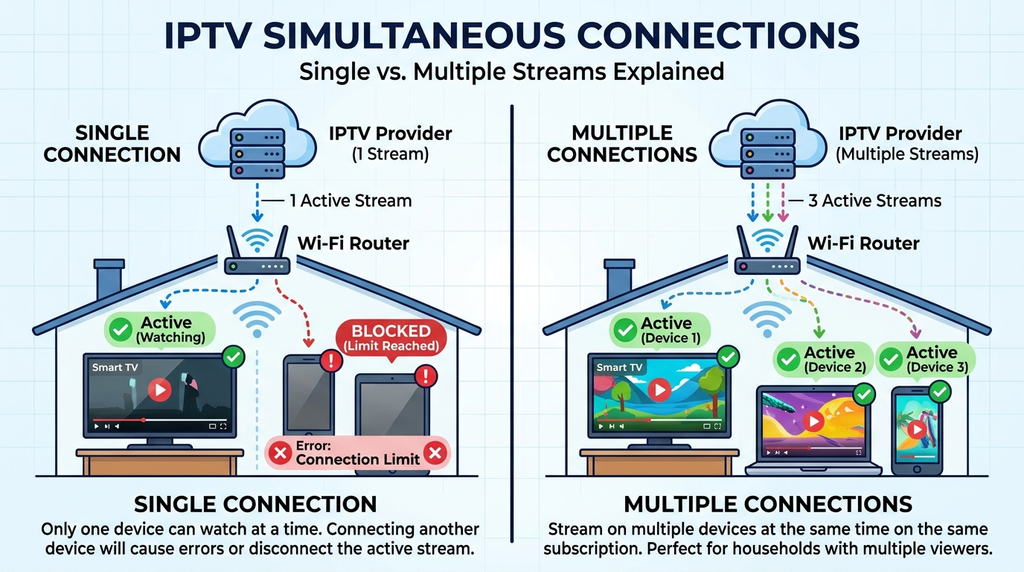
Possibly, but installed devices and concurrent playback are different. The selected connection limit controls how many streams may run simultaneously. Separate device policies may also apply.
Is an IPTV account the same as an IPTV player?
No. The account provides subscription credentials and access conditions. The player is software used to sign in and play supported streams. Some players may charge separately.
What do I receive after ordering?
The precise delivery process should be confirmed before purchase. Depending on the service, account setup may involve credentials, server details or another compatible activation method. Do not assume a guaranteed activation time unless the seller explicitly commits to one.
Can I use an IPTV account on a Fire TV Stick?
A Fire TV Stick can run supported streaming apps, but compatibility depends on the player, software version, account format and legitimate availability of the content. Review the device-specific setup guide first.
Is the annual option billed monthly?
The site’s published annual one-connection price is presented as a total subscription price. Its monthly equivalent is only a comparison calculation; it is not presented here as a monthly payment plan.
Are all IPTV accounts legal?
No. IPTV technology is not inherently illegal, but content distribution requires appropriate authorisation. Confirm rights and regional terms before purchasing access to copyrighted programmes.
What should I do if my account stops working?
Check account expiry, internet connectivity, app compatibility and the number of active streams. If those checks do not resolve the issue, contact the official seller with the order reference and error details, without posting your password publicly.
Final Checklist Before Choosing Your Account
Before you proceed, make sure the plan fits your device, intended number of viewers, prepaid budget and permitted content requirements. Read the pricing and refund information at the point of purchase, secure your credentials, and keep a copy of the order confirmation.
If these conditions are clear and the content rights and UK availability have been substantiated, you can compare Digital Lizard IPTV subscription options and continue to the official subscription page. If any material term remains uncertain, use the contact page to obtain clarification before paying.
EDITORIAL APPENDIX — NOT FOR WORDPRESS ARTICLE BODY
A. Research brief
- Keyword: buy iptv account; audience: UK users evaluating paid IPTV account access.
- Dominant intent: transactional, supported by commercial comparison questions.
- SERP sampling: current results include account/subscription guides emphasising written plan terms, device compatibility, payment risk, connection limits and regional/legal verification. Examples inspected include getukiptv.co.uk, tellywren.com, uk4kiptv.com, gettv.uk, and udashboard.uk. They are SERP observations, not endorsements.
- Differentiation: specifically explain the distinction between account, player, and content rights; include real brand pricing, device-login readiness, connection scenarios and failure diagnostics.
- Cannibalisation: existing /buy-iptv/ and /buy-iptv-subscription-uk/ create meaningful overlap. New account-focused page requires a distinct purpose and internal linking; alternatively incorporate this material into the existing UK guide if its traffic and ranking data warrant consolidation.
- Audience question evidence: site FAQs verify questions about devices, connection count, player requirements, account setup, refunds and support. Other FAQ phrasings above are editorially suggested, not verified Google People Also Ask queries.
- Limits: no Google Search Console metrics, no direct Google PAA export, no independent proof of the site’s UK licensing and territorial rights, no verified UK price in GBP, and no published test result.
B. Rank Math pack
- Primary focus keyword: buy iptv account
- Secondary focus phrases: iptv account UK; iptv account subscription; IPTV login details; IPTV account for Firestick; multi-device IPTV account
- Suggested title: Buy IPTV Account: UK Plans, Setup & Buying Guide
- Title alternative: Buy IPTV Account Online: Prices & Setup Explained
- Title alternative: Buy IPTV Account in the UK: What to Check First
- Meta description: Buy IPTV account access with Digital Lizard IPTV. Compare subscription lengths, connections, device setup and important checks before ordering.
- Proposed slug: buy-iptv-account
- Proposed canonical once live: https://www.digitallizardiptv.us/buy-iptv-account/
- Category: IPTV Buying Guides
- Tags: IPTV account, UK IPTV guide, IPTV devices, IPTV setup, streaming subscriptions
- Locale: en-GB; schema: BlogPosting/Article as appropriate. Target a useful length rather than a fixed keyword-density metric.
D. Internal link audit
| Anchor | Verified destination | Purpose |
|---|---|---|
| Subscription plans / pricing page | https://www.digitallizardiptv.us/pricing-plans/ | Real published one-connection pricing |
| Device setup instructions / guide | https://www.digitallizardiptv.us/setup-guide/ | Device-family setup guidance |
| Digital Lizard IPTV FAQs | https://www.digitallizardiptv.us/faqs/ | Connection count, refunds, app requirements |
| Subscription form / official subscription page | https://www.digitallizardiptv.us/subscription/ | Order interface |
| Terms and conditions | https://www.digitallizardiptv.us/terms-condition/ | Account and purchase rules |
| Contact page | https://www.digitallizardiptv.us/contact-us/ | Official support route |
| Digital Lizard IPTV Not Working? | https://www.digitallizardiptv.us/digital-lizard-iptv-not-working/ | Troubleshooting |
All URLs were found via publicly crawled site pages during the research session; final publishing validation remains necessary. Consider contextual links from existing /buy-iptv/, /buy-iptv-subscription-uk/ and the general pricing hub if the new article is published.
E. External source audit
| Source | URL | Supported claim |
|---|---|---|
| Trading Standards Scotland | https://www.tsscot.co.uk/priority-areas/iptv-illicit-streaming/ | IPTV technology versus illicit content and safety risks |
| Ofcom | https://www.ofcom.org.uk/tv-radio-and-on-demand/broadcast-standards/iptv | IPTV delivery, broadcast regulation, children |
| Consumer Rights Act 2015 | https://www.legislation.gov.uk/ukpga/2015/15/part/1/chapter/3/enacted | Digital-content consumer rights |
| Consumer Contracts Regulations | https://www.legislation.gov.uk/uksi/2013/3134 | Distance-contract information and cancellation framework |
The statutory sources require a final check for current application to the particular service model; this article is general consumer information, not legal advice.
F. Image and media plan
| Placement | Dimensions | File | ALT text | Method |
|---|---|---|---|---|
| Hero | 1600 × 900 | buy-iptv-account-uk.webp | Smart television and streaming devices used to compare IPTV account options | Original illustration |
| Connection section | 1200 × 675 | iptv-simultaneous-connections.webp | Diagram explaining one versus multiple simultaneous IPTV streams | Original explanatory diagram |
| Device section | 1200 × 675 | iptv-supported-device-check.webp | Checklist comparing IPTV player compatibility across television and mobile devices | Original diagram |
| Setup section | 1200 × 675 | iptv-account-login-fields.webp | Example of username, password and server fields in a generic IPTV player | Generic mock-up clearly labelled, not an actual app screenshot |
Use compressed WebP/AVIF as appropriate, descriptive dimensions and responsive srcset. Do not defer the critical hero if it would harm LCP.
G. Schema and technical setup
- Use Rank Math BlogPosting/Article schema if it correctly represents the page; do not duplicate JSON-LD.
- Supply real author, publisher, dates, featured-image URL, description and canonical after publication.
- Check WordPress indexability, 200 response, robots, XML sitemap, mobile render, breadcrumbs, internal links and canonical.
- Do not add hreflang without genuine equivalent UK/localised pages.
- Verify LCP <= 2.5s, INP <= 200ms and CLS <= 0.1 from actual performance data rather than claiming a pass.
H. Rank Math audit
| Criterion | Status |
|---|---|
| Keyword in title, description, suggested URL, H1 and introduction | PASS in draft |
| Natural semantic vocabulary and readable headings | PASS in draft |
| Internal and external editorial links | PASS in draft; recheck on publication |
| Proposed image ALT text | NEEDS REVIEW until images exist |
| TOC anchors | NEEDS REVIEW in WordPress renderer |
| Real publication canonical / schema / sitemap / indexability | REQUIRES WORDPRESS CHECK |
| Mobile performance | REQUIRES WORDPRESS CHECK |
| Content rights, UK availability and purchase eligibility | NEEDS REVIEW |
No measured Rank Math score is claimed.
I. GEO/AEO audit
- Direct answer: PASS.
- Entity distinction (account/player/content/device): PASS.
- Practical original value: Connection scenarios, account setup and diagnostic matrix present.
- Sources: Official regulations, regulator and site pages; UK content rights not independently established.
- Question origin: Site FAQ themes are verified; other phrasings are semantically suggested.
- AI discoverability: Clear answer structure; no invented citation/visibility metrics.
J. Final publication verdict
REQUIRES FACT VERIFICATION. Before publishing as a transactional UK sales page, verify rights to distribute advertised content in the UK, country eligibility, current checkout prices and payment/cancellation/refund disclosures. Also decide whether this page adds enough distinct value beyond the already published UK buying guide to avoid keyword cannibalisation.