
Searching for the best IPTV provider worldwide can quickly become confusing. Do you need a service that works on your television at home, a plan for several screens, access while travelling, or simply a straightforward subscription with clear terms? The biggest advertised channel count does not answer those questions. What matters is whether a service fits your location, devices, viewing habits and budget—and whether the content you intend to access is available with the necessary permissions.
This buyer’s guide explains how to assess worldwide IPTV claims and use those checks when considering Digital Lizard IPTV. You’ll find its publicly listed one-connection prices, practical setup guidance, a repeatable quality-test method, common troubleshooting steps and important questions to ask before paying. The advice is written with UK viewers in mind, while remaining useful for readers elsewhere.
Quick answer: There is no independently verified, universal winner for the title best IPTV provider worldwide. A better buying decision starts with location and content eligibility, compatible devices, the number of simultaneous streams, real-world connection quality, clear pricing and responsive support. Digital Lizard IPTV is one option to evaluate against those criteria, rather than an independently proven number-one provider.
Table of Contents
Table of Contents
What Makes an IPTV Provider Suitable Worldwide?
IPTV means Internet Protocol Television: video is delivered using internet networking rather than relying solely on traditional terrestrial, cable or satellite distribution. That describes a delivery method, not a guarantee of universal access to particular programmes or channels. For a concise explanation of how internet-delivered television fits into the UK market, see Ofcom’s information on IPTV.
A provider may use the word worldwide to describe its audience, website availability, compatible devices, or the range of programme categories it advertises. Those claims mean different things. A service might let you create an account from one location but limit certain programmes in another. A mobile player might install successfully during a trip while the associated subscription remains subject to regional conditions.
That is why a claim to be the best IPTV provider worldwide should be judged on evidence, not a slogan. Ask three questions first:
- Can I legitimately use the service where I live? Confirm country eligibility and the distribution rights relevant to the programming you want.
- Will it work with my equipment? Check the exact operating system, compatible player and login method—not just the device category printed on a website.
- Does the subscription match my household? Compare simultaneous viewing, duration, total checkout price and support arrangements.
It also helps to distinguish the service from the player. An IPTV provider manages a subscription and provides the necessary account information. An IPTV player is an application used to display supported streams. A streaming device is the television, stick, set-top box, computer or phone that runs the player. Installing a player does not itself supply a subscription or prove that third-party streams are authorised.
For a broader introduction to what a buyer should examine, see our general best IPTV buying guide. The guide you’re reading focuses on worldwide suitability and the specific, publicly documented Digital Lizard subscription choices.
Seven Essentials to Compare Before Subscribing
Rather than relying on an unverifiable top-ten list, use the same questions for every service you consider. An answer marked not confirmed is more useful than a made-up score.
1. Confirm location and programme availability
Start with the country where the subscription will be used most often. Ask whether sign-up and playback are supported there, and whether any important categories, programmes or events are unavailable. Availability can change, particularly for programmes licensed by territory. Do not assume that a broad category name confirms any specific channel or sporting event.
If you often travel, ask a separate question about temporary use abroad. Normal home access and travel permissions are not interchangeable.
2. Match the service to your actual devices
Write down the model and operating system of your primary screen. For example, a smart TV and an external streaming stick can use different application stores, even when connected to the same television. Check whether a compatible application is available for your particular model and whether it accepts the subscription credentials you will receive.
If the app requires its own purchase or activation fee, include that expense in the calculation. A subscription fee and a third-party player fee are separate products.
3. Count simultaneous viewers—not devices you own
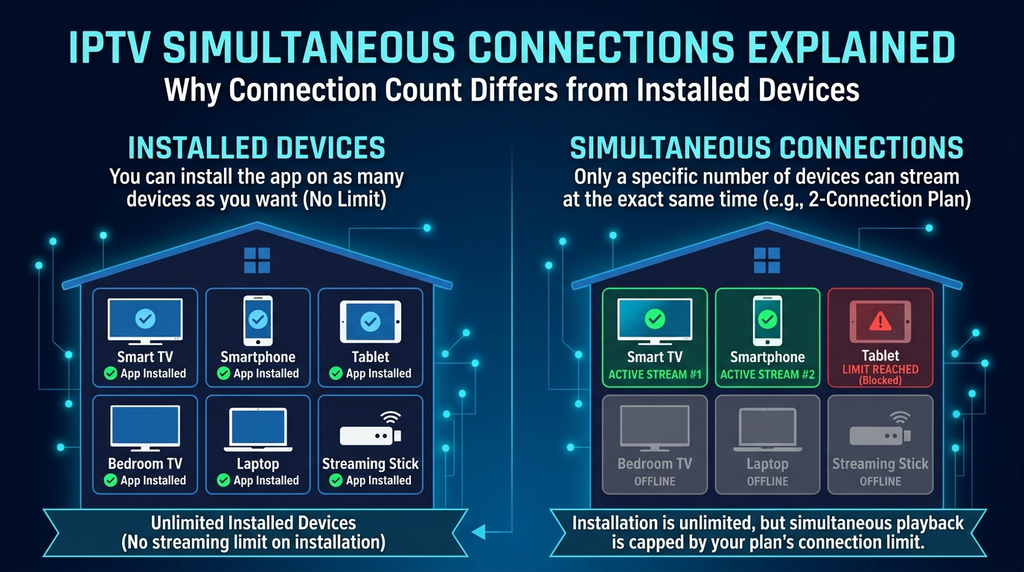
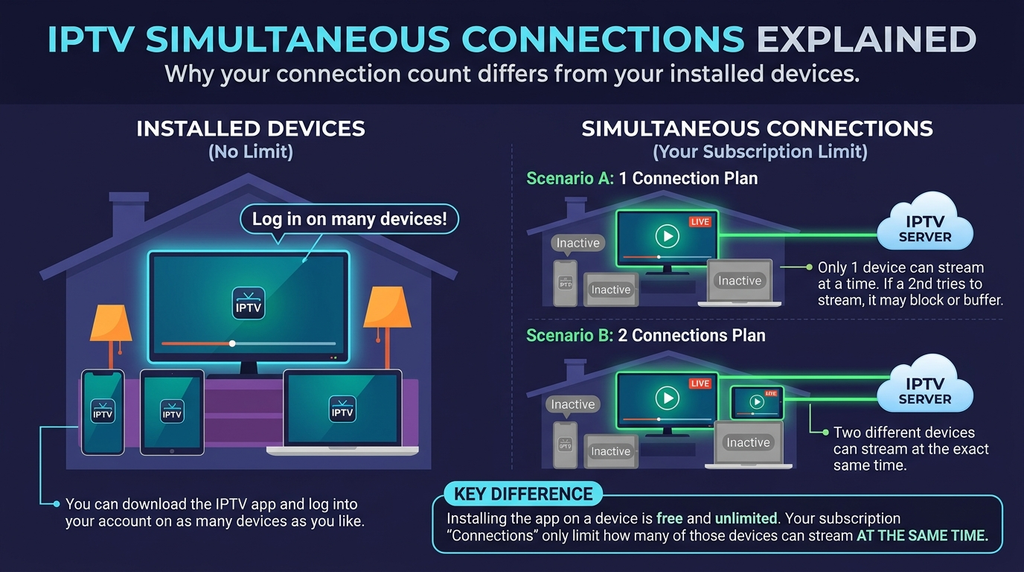
A household might own four internet-connected screens but only watch television on one at a time. Conversely, two people using different televisions simultaneously need a plan that permits two concurrent streams. The number of installations is not the same as the number of allowed connections.
To choose accurately, picture a busy evening: a television in the living room, another screen in a bedroom and possibly a phone. Count the screens that need to play at the same time.
4. Compare total cost, not only a monthly equivalent
A twelve-month package may have a lower monthly equivalent but require a larger payment at checkout. A shorter option costs more per month but reduces your initial commitment. Check the total charge, currency, renewal conditions, any app fees and refund eligibility before selecting a duration.
UK readers should be especially careful when a website displays prices in US dollars. Your bank or payment service may show a different final amount after currency conversion or applicable fees. Do not treat the dollar figure as a guaranteed GBP price.
5. Test playback in conditions that resemble real use
Words such as ultra-fast, buffer-free and 4K are not independent measurements. Picture quality depends on the available programme, device, application, video encoding, home network and internet route. A player showing a 4K label does not establish that every stream is delivered in 4K.
A useful test asks whether your preferred material loads correctly, stays stable at the times you normally watch, changes programmes without excessive delay and behaves consistently on your main screen. The testing method below offers a structured way to record the results without pretending to have carried out a laboratory benchmark.
6. Look for understandable support and troubleshooting guidance
Before paying, locate the setup instructions and contact page. Can you explain which model you use and receive help suited to that device? Are common issues—wrong login details, an unavailable player, buffering, or connection limits—covered somewhere accessible?
Support availability should be described realistically. A published contact form is useful, but it does not prove a particular response time. Ask about expected response hours when that matters to you.
7. Read the conditions, including refunds and account security
A trustworthy buying process should let you review the terms before checkout. Look for the deadline for submitting a refund request, circumstances under which it may be accepted, how a request is reviewed and what information you must provide.
Keep login details private. Avoid publishing server addresses, usernames or passwords in public comments or screenshots. If you receive installation instructions directing you to an unfamiliar download, confirm that it is an authentic source before opening it.
A simple evaluation table
| Factor | What to verify | Result to record |
|---|---|---|
| Country eligibility | Supported location and relevant programme rights | Confirmed / Unconfirmed |
| Primary device | Specific model, supported player and login format | Confirmed / Unconfirmed |
| Household use | Number of concurrent streams needed | 1 / 2 / 3+ |
| Cost | Total due today and payment currency | Exact checkout figure |
| Quality | A real playback check on your normal connection | Pass / Needs investigation |
| Support | Contact method and setup assistance | Confirmed / Unconfirmed |
| Terms | Refund-request period and conditions | Read / Not yet read |
Buying rule: Do not let a low price override a failed compatibility check or unresolved questions about content rights and regional eligibility.
Digital Lizard IPTV: What the Website Actually Offers
Digital Lizard IPTV presents itself as an internet-delivered television subscription service used through compatible player applications. Its website publishes subscription durations, one-connection pricing, options for up to five simultaneous connections, device-setup instructions and customer-support information. It advertises live and on-demand programme categories, with picture-quality options depending on the source and technical conditions.
Those are published product descriptions, not independent verification of every channel, broadcast permission, streaming speed or country of service. If a particular programme or overseas location is essential to your decision, contact Digital Lizard IPTV and ask for specific written confirmation before buying.
Why the subscription structure may be useful
The site lets a visitor approach a purchase through three practical decisions: how many screens need simultaneous playback, how long to subscribe, and which device will be used. That is a more useful starting point than choosing a package solely because of a headline channel count.
The Digital Lizard IPTV FAQs also explain that a separate compatible player is generally required, that third-party application terms may differ, and that network or device conditions can affect performance. These limitations matter for a UK buyer deciding whether the service can fit an existing setup.
What should not be assumed
Do not assume that every television application is supported, that every country has the same catalogue, that every advertised category contains a specific event, or that every stream is delivered in ultra-high definition. The existence of a checkout page or customer support does not independently establish rights to every programme. Ask questions relevant to your intended use and assess the answers against the published terms.
Digital Lizard IPTV Plans and Prices: The Published Figures
The Digital Lizard IPTV pricing page currently lists the following one-connection subscription options. The currency displayed on the site is US dollars. These are publicly advertised figures observed on 19 November 2026, not a promise that checkout prices will never change.
| Duration | Displayed total for 1 connection | Approximate monthly equivalent | Upfront commitment |
|---|---|---|---|
| 1 month | US$16 | US$16.00 | One month |
| 3 months | US$36 | US$12.00 | Three months |
| 6 months | US$55 | US$9.17 | Six months |
| 12 months | US$75 | US$6.25 | Twelve months |
The monthly equivalents are arithmetic comparisons: the listed term total is paid upfront, subject to the checkout shown when ordering. They are not separate pay-monthly instalments. Multi-connection pricing is selected through the website’s plan interface and should be checked directly rather than extrapolated from these one-connection figures.
One connection versus multiple connections
- One connection: Suitable when only one screen needs to play a stream at any given moment.
- Two connections: Worth considering when two household members regularly watch independently at the same time.
- Three to five connections: May suit larger households, but buy only the concurrency you actually expect to use and confirm the displayed price.
For example, a person who moves from a living-room television to a phone later in the evening may not need two simultaneous connections if playback occurs only on one screen at a time. A family watching separate programmes in two rooms at once should evaluate a two-connection option.
Which duration is sensible for a first order?
A one-month term limits the initial financial commitment and creates an opportunity to assess usability and reliability. A twelve-month term reduces the illustrative monthly equivalent but carries a larger upfront payment. Neither is automatically the best purchase. Choose the longer term only when you understand compatibility, location restrictions, relevant content availability and the payment conditions.
The website describes a three-day refund-request period, subject to conditions—not an automatic, unconditional three-day money-back promise. The conditions and review process are set out in the Digital Lizard IPTV refund policy. Trial availability should be confirmed rather than assumed.
Which Devices Can You Use With an IPTV Subscription?
Most setup problems are easier to avoid than to repair. Before purchasing, identify the exact hardware, software version, application source and login method. The Digital Lizard IPTV setup guide describes workflows for several common device families; it does not mean every model or app version is guaranteed to work.
| Device type | First compatibility check | Typical setup consideration |
|---|---|---|
| Smart TV | TV manufacturer, model year, operating system and available player | App store availability differs between television platforms |
| Fire TV device | Fire OS version and compatible supported application | Menus and app availability can vary by model |
| Android TV or TV box | Operating system and player compatibility | Confirm the correct television-oriented app |
| Android phone or tablet | Current Android version and supported app | Mobile and TV interfaces may differ |
| Apple TV | tvOS model and a compatible player from the device’s store | An iPhone app is not automatically a tvOS app |
| Windows or macOS computer | Compatible viewing software and supported credentials | Network firewalls and software permissions may matter |
General setup process
- Connect the device to a reliable internet connection.
- Open its official or trusted application store and identify a player compatible with that device.
- Verify whether the player supports the login format provided by the subscription.
- Install the player and open its account or playlist setup screen.
- Enter the subscription credentials exactly as provided, without extra spaces.
- Allow the player to synchronise the available categories and guide data.
- Test playback and the programme guide before assuming the setup is complete.
The exact menu names will differ. Do not install an unfamiliar application or use an unverified download code simply because a video tutorial claims it is required. If a player has an optional premium fee, check what that purchase unlocks; it may be separate from the streaming subscription.
Smart TV versus streaming stick: which is easier?
A built-in TV app may be convenient because it avoids another remote or device. An external stick or box can be helpful where a TV’s app store does not contain a compatible player. The correct choice depends on the specific equipment: neither approach guarantees better streaming quality by itself.
Wi-Fi versus Ethernet
An Ethernet connection can remove some local wireless interference and is often a sensible test when streaming stutters. If using Wi-Fi, keep the device within good range, avoid congested placement and check whether other household devices are consuming significant bandwidth. Ofcom’s broadband and Wi-Fi guidance provides practical steps for diagnosing home connection problems.
How to Test IPTV Picture Quality and Streaming Stability
There is no useful worldwide ranking without repeatable evidence. Instead of claiming that a service has been tested across countries when it has not, use this 30-minute home evaluation framework on a legitimately available test or subscription. It is an editorial method, not a claim that Digital Lizard IPTV has passed it.
Step 1: Record the starting conditions (5 minutes)
Write down your country, internet connection type, player name and version, device model and time of day. Check whether the device can use other internet services normally. If possible, note whether you are on Wi-Fi or Ethernet and whether the household is running heavy downloads.
Step 2: Check login and navigation (5 minutes)
Open the player, confirm that the account loads, look for available categories and test the remote or touch controls. If a programme guide is included with your selected source, check whether titles and times are displayed sensibly. Do not assume that programme-guide data is available for every category.
Step 3: Observe ordinary playback (10 minutes)
Choose a programme that the service is confirmed to make available to you. Record whether playback begins, stays stable, and responds when you change to another available item. Note visible buffering, audio mismatch or repeated errors rather than reducing the whole experience to a vague label such as fast or slow.
Step 4: Try your normal peak viewing period (5 minutes)
If you normally watch in the evening, a daytime check is not enough. Repeat at least a short part of the evaluation at your usual viewing time. Network congestion and server conditions can change, so one successful session cannot prove future uptime.
Step 5: Check support and conditions (5 minutes)
Find the published support channel, plan duration, concurrent-stream limit and refund instructions. If something is unclear, ask a precise question while you still have the details. A helpful response should address your device and issue rather than provide generic promises.
Your test worksheet
| Test | What to write down | Interpretation |
|---|---|---|
| Account loads | Yes / No, exact error | Separates login issues from playback issues |
| Categories load | Yes / No | Tests initial synchronisation |
| Stream starts | Time or visible delay | Helps identify initial-loading problems |
| Playback holds | Number and timing of stalls | Gives a reproducible description |
| Audio and picture | In sync / Not in sync | Identifies a specific defect |
| Second screen | Pass / Not tested | Use only when the plan permits another stream |
| Support | Contacted / Not needed | Records whether help was available |
Why this method is better than a star rating: It records evidence related to your actual use, without inventing worldwide benchmarks or treating a single successful video as proof of overall service quality.
Can a Worldwide IPTV Subscription Be Used in the UK and Abroad?
Worldwide access needs to be verified country by country. It is possible for a website to accept visitors internationally while subscriptions, programmes, payment methods or technical support differ by region. Network conditions also vary between homes and countries.
For viewers in the United Kingdom, confirm four things before ordering: whether the service accepts UK customers, whether your chosen content is offered with the relevant permissions, whether the player is available on your particular equipment, and what currency and total price will appear at checkout.
If you live outside the UK or travel frequently, ask whether the same subscription can be used in each intended country. Do not infer permission from the fact that a login screen opens. Also distinguish temporary travel from permanent relocation; provider terms may treat these differently.
A short note on UK viewing rules
IPTV technology itself is not automatically unlawful. The rights to provide particular programmes and the applicable consumer rules are separate matters. UK government guidance on illicit streaming devices explains the distinction between ordinary streaming equipment and accessing content without the copyright owner’s permission.
A UK TV Licence may also be required for live television viewing, including live television watched over the internet. That question is separate from paying for any commercial subscription. Check the current official TV Licensing guidance for watching live online for the circumstances that apply to your household.
Because individual rights documentation for every advertised Digital Lizard IPTV programme was not independently established for this guide, do not interpret this article as a blanket certification of licensing or global content availability. Ask the provider about specific content where this is material to your purchase.
Common IPTV Problems and Practical Fixes
A failed stream does not always mean the same thing. It helps to identify which stage is failing before changing account details, reinstalling applications or purchasing another subscription.
| Symptom | Possible causes | First useful check |
|---|---|---|
| Player cannot be installed | Unsupported TV model, operating-system version or app store | Verify the exact device and trusted app source |
| Username or password rejected | Typo, accidental space, wrong server details or inactive account | Compare credentials with the original activation information |
| Categories do not appear | Incomplete synchronisation, network issue or account configuration | Restart the app, check internet access and request support if it persists |
| Stream buffers repeatedly | Weak Wi-Fi, congested internet route, device workload or source issue | Compare Wi-Fi with wired access where possible |
| Sound works but picture fails | Player decoding issue or unsupported video format | Update the supported player and test another compatible device |
| One programme fails but others work | Specific content or source issue | Record which item fails and when |
| Playback stops on another screen | Simultaneous connection limit | Check the number of concurrent streams in the purchased plan |
| Works on phone but not TV | Device-specific player or network issue | Compare app versions and connections |
A five-minute diagnosis
First: Confirm the device still has a functioning internet connection. Open an ordinary webpage or use a trusted connectivity check.
Second: Identify whether the problem starts at installation, sign-in, category loading or actual playback. Those are different failure stages.
Third: Check the username, password and any required service URL against the original account message. A single extra space can cause login failure.
Fourth: Restart the player and, where sensible, the device. For buffering, test a stronger connection and stop background downloads. Do not repeatedly reset your router if other internet activities are working correctly without a reason.
Fifth: If the problem persists, record the device, player version, approximate time, exact error and whether other streams or devices work. Send this information through the site’s support channel, without including a password in public messages.
For a longer symptom-by-symptom process, read our Digital Lizard IPTV troubleshooting guide.
Why buffering has no single guaranteed fix
A speed-test result is only one clue. Video may still stutter because of Wi-Fi interference, the decoding performance of an older device, a particular stream source or congestion beyond your home. Conversely, a temporarily slow result does not prove that the subscription is always unreliable. Compare conditions systematically and contact support with observations that can be reproduced.
Which Subscription Fits Your Household? Three Practical Examples
These are illustrative examples, not descriptions of real Digital Lizard customers or controlled service tests.
Example 1: One television, occasional phone use
A viewer watches in the living room most evenings and sometimes switches to a phone, but never watches both simultaneously. The first question is whether the two devices have compatible players; the second is whether one connection is sufficient. A shorter term may be a reasonable way to minimise the initial commitment while assessing compatibility.
Example 2: Two viewers in different rooms
Two household members want to play different available programmes at the same time. A plan permitting only one concurrent stream would not match that routine. They should check the two-connection option and the final checkout price, rather than assuming a one-connection purchase will work because the app can be installed on both televisions.
Example 3: A UK household that often travels
The main screen is in the UK, but the account holder spends some time abroad. Before paying for a long term, the household should ask about use in both locations, the relevant content availability and any regional limits. The ability to carry a streaming stick does not establish permission to receive the same programmes everywhere.
A decision checklist before purchase
- Have I confirmed the country and content that matter to me?
- Do I know my exact primary device and compatible player?
- How many people will stream at the same time?
- Do I understand the full payment, its currency and renewal conditions?
- Have I read the refund requirements and confirmed any trial availability?
- Can I reach support if setup does not work?
- Am I choosing a plan based on needs rather than unsupported rankings?
Frequently Asked Questions
Is there one best IPTV provider worldwide in 2026?
No independently verified provider can be declared best for everyone without comparable evidence. Countries, content availability, app compatibility, connection quality, pricing and household needs differ. Use a consistent checklist instead of an unsupported global ranking.
Does Digital Lizard IPTV work in every country?
The website discusses streaming on compatible devices, but that does not independently confirm all-country eligibility or identical content access. Ask support about your specific location and relevant programme availability before subscribing.
How much does Digital Lizard IPTV cost for one connection?
At the time of review, the site’s published totals were US$16 for one month, US$36 for three months, US$55 for six months and US$75 for twelve months. Confirm the current final amount and currency at checkout because offers can change.
Can I watch on more than one device?
The website offers a connection selector for up to five simultaneous streams. A connection represents concurrent playback, not simply the number of devices where an application has been installed. Choose the limit that fits your household and check its displayed price.
Do I need a special IPTV player?
A compatible player application is generally needed. Availability, login support and any separate app fees depend on the player and operating system. Use the device-specific setup guidance before choosing a subscription.
Does 4K IPTV mean every programme streams in 4K?
No. A 4K label can describe a capability or an option, not a universal guarantee. Actual resolution depends on the available source, player, device, display and network conditions. Confirm the quality of any specific content that matters to you.
Is a free trial included automatically?
Do not assume so. Trial availability and pricing can change. Ask the provider whether a short trial or other evaluation option is currently available and what it includes.
Is the three-day refund period an unconditional guarantee?
No. The website states a three-day refund-request window subject to its published policy. Requests are reviewed against eligibility and circumstances. Read the policy and keep proof of purchase.
What should I do if the subscription stops working?
Identify whether the problem concerns app installation, account login, category loading or stream playback. Check the internet connection and exact credentials, then contact support with device details and a concise description of the problem. Never expose your password in a public message.
<a id=”conclusion”></a>
Final Recommendation: Choose the Best-Fit IPTV Plan, Not the Loudest Claim
The search for the best IPTV provider worldwide becomes more useful when you replace universal rankings with practical checks. Confirm where the subscription can be used, what content is available with appropriate permissions, which applications your devices support, how many streams your household needs, the real amount due at checkout and what support is available if something goes wrong.
Digital Lizard IPTV publishes a selection of subscription durations, a simultaneous-connection selector, device setup information and a support route. Those details give you a starting point for evaluating whether its offer matches your requirements. They do not remove the need to verify the countries and programmes relevant to your own purchase.
Ready to take the next step? Review Digital Lizard IPTV’s current plans and prices, choose the number of simultaneous connections you actually need, and confirm any outstanding device or regional questions before checkout.