
An IPTV free trial UK search can lead to very different offers: a genuinely free, time-limited test; a paid short-term subscription; a money-back arrangement; or a streaming app that is free to install but does not include any television channels. Those offers should not be treated as interchangeable.
If you live in the UK and want to evaluate an internet TV service, start with three questions: Is the content legally supplied? What will the trial actually cost? Will it work on the device and connection you use at home? Only then should you test picture stability, programme-guide accuracy, support and household connection limits. This guide gives you a practical way to do that without relying on unsupported promises of thousands of channels, flawless 4K or guaranteed sports coverage.
Quick answer: A useful IPTV trial has clear written terms, an identifiable provider, lawful content rights, compatible apps, transparent payment and cancellation rules, and enough time to test your normal viewing conditions. A free trial is not proof of licensing or long-term reliability.
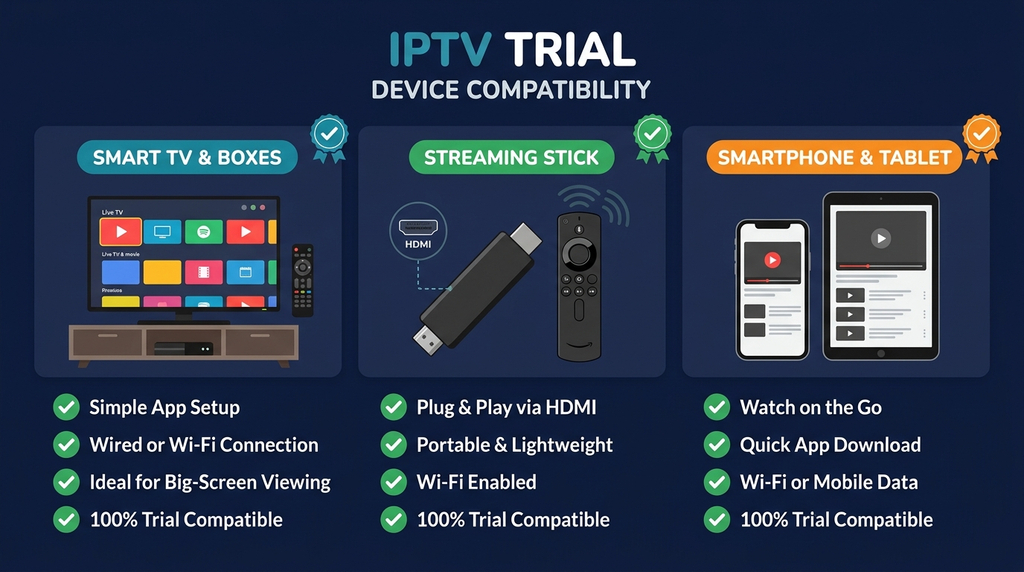
Table of Contents
Table of Contents
What counts as an IPTV free trial in the UK?
IPTV means delivering television or video using internet protocols. It describes a method of delivery, not a particular company, subscription or permission to distribute a programme. An IPTV player may simply display a stream supplied by a separate, authorised service. Other products combine a broadcaster’s content, account and app in one package.
When a website advertises a trial, establish which of these models it means:
| Offer | What you normally receive | What to check before proceeding |
|---|---|---|
| Genuine free trial | Temporary access without a trial charge | Duration, whether a payment card is required and whether billing begins automatically |
| Short paid trial | Access for a small upfront fee | Exact price, currency, included features and renewal terms |
| Money-back arrangement | A paid purchase with conditions for requesting a refund | Eligibility, deadline and whether a refund is discretionary or guaranteed |
| Free player app | Software for opening an authorised stream or playlist | Whether channels are included (often they are not) and whether premium app features cost extra |
| Free broadcaster-backed streaming | Free-to-access programmes through an official service | Supported hardware, geographic restrictions and TV Licence requirements |
The distinction is more than wording. The UK Advertising Standards Authority explains that a free-trial offer should disclose material subscription commitments, including whether paid billing starts after the trial. It also warns against calling a refund-based purchase a free trial. Read the ASA’s guidance on the use of “free” before trusting an unclear promotion.
Does Digital Lizard IPTV currently have a UK free trial?
Digital Lizard IPTV’s current subscription page and published pricing page describe paid plans. Its homepage says trial availability and pricing can change, so a free UK trial should not be assumed to be active. Ask the company to confirm in writing whether any trial is presently offered in your location, what it includes and what happens when it ends. Its contact page provides the place to request clarification.
The site’s refund policy currently describes a three-day window for submitting an eligible refund request, subject to review and conditions. That is not the same as a free trial, and it should not be advertised as an unconditional refund.
IPTV Free Trial UK: Seven Checks Before You Request Access
1. Confirm the provider and content rights
A working stream does not establish that the seller is licensed to distribute it. Check who operates the service, how to contact the business, and whether its claimed content rights can be substantiated for UK viewers. Be particularly cautious of offers combining a vast catalogue of normally paid premium sport, new films and subscription channels at implausibly low prices without a clear explanation of authorisation.
The UK Intellectual Property Office’s guide to illicit streaming devices distinguishes legitimate use of streaming hardware from using it to access content without the copyright owner’s permission. The legality depends on the content source and rights, not on the shape of the device or the name of its player.
2. Obtain the exact trial terms
Ask when access starts and ends, whether it is truly free, whether you must provide card information, whether renewal is automatic, and how to cancel. If the trial expires at midday but your household normally watches live TV in the evening, it may tell you little about typical performance. Save the seller’s written answer and the offer page.
3. Check the precise device and operating system
“Works on Smart TV” is not sufficiently specific. A Samsung television commonly uses Tizen, LG uses webOS, Android TV and Google TV have their own app ecosystems, and Apple TV uses tvOS. Application availability can also vary by model, year and region. Compare the exact model with a current support guide instead of assuming an Android APK works on every screen.
Our device setup guide describes common setup paths, but you should verify the app listing for your own device before committing to a service.
4. Understand what is actually included
Ask which types of authorised content, live channels, video-on-demand features and programme guides are part of the specific offer. An eye-catching channel-count claim does not establish that your preferred programmes are available, lawful to redistribute, or reliable. If a programme matters to you, obtain a clear answer about the rights and availability rather than relying on a promotional logo.
5. Check simultaneous viewing rules
Two devices with the same app installed do not necessarily mean two screens may stream at the same time. Some plans count concurrent connections rather than installations. Ask whether one household member can watch on the living-room television while another uses a phone, and whether different networks or travel are restricted. The Digital Lizard IPTV FAQs explain its published distinction between devices and simultaneous connections.
6. Check the full cost after the test
Find the final checkout total, currency conversion, applicable taxes, third-party player charges, renewal timing and cancellation route. A player licence, paid programme subscription and internet connection are separate possible costs. If payment terms are difficult to find, do not submit your card details merely to investigate.
7. Evaluate support and privacy
Send support a genuine question about your exact TV model or account format. A useful response should identify the app or troubleshooting step rather than repeat generic sales copy. Also review privacy terms and use only official download sources where possible; do not send full payment-card details or credentials through public forums or unknown “account checker” sites.
How to test IPTV during a short trial
A trial has more value when it follows a repeatable plan. Use the same equipment, network and viewing periods you expect to use after purchasing. Otherwise, a better router or a different room could make one trial appear stronger for reasons unrelated to the provider.
Before the trial starts: prepare a baseline
Write down your television or streaming-stick model, player app, internet connection type, approximate Wi-Fi signal quality, and the programmes you are permitted to access and want to test. Confirm that your chosen account and its content rights are valid in the UK. Note the offer’s expiry time, billing rules, support channel and connection allowance.
Test an existing legitimate stream, such as an official broadcaster app, on the same device. If that already buffers, your home network or device needs attention before you can fairly evaluate a different service. A speed-test number by itself cannot prove that video playback will be stable.
First session: compatibility and basic playback
Start with the device you will use most often. Install a compatible application through its official store when available, choose the supported login method and enter the supplied account information privately. Test several authorised channels or programmes from different categories rather than relying on one successful stream.
Look for normal start-up, clear audio, stable video, appropriate subtitles where provided, usable remote controls and a guide that matches the programme you are watching. Record failures with the device, app version and time. Do not change multiple settings at once; that makes it harder to identify what helped.
Evening session: realistic viewing conditions
Repeat the same tests when your household normally watches. Many viewers choose an evening because their home Wi-Fi is shared by more devices, although the actual busy period varies by household and service. Watch long enough to see whether playback remains steady and whether a channel can recover from an interruption. Avoid assuming an advertised “4K” label proves that every programme is delivered at that resolution.
Try normal channel switching, a longer programme and a second eligible device if your proposed plan allows concurrent access. If a second stream disconnects the first, check the connection limit before treating it as a fault. If both fail only on your home network, compare an authorised stream on another connection to help narrow the cause.
Final session: support, billing and decision
Send one realistic support query while access is still active. Record the reply, not just the time it took. Then review the written trial end date, what the next payment would be, and how to cancel before a renewal. If an essential requirement fails or the seller cannot substantiate legal distribution rights, do not buy a longer plan on the assumption that the problem will disappear.
A short trial cannot prove year-long uptime. It can show whether a particular authorised offer works for your household during the limited conditions you tested.
Testing on Fire TV, Android TV and Smart TVs
The installation process depends on the television platform, not on the marketing name of the IPTV service.
| Device | Sensible starting point | Common limitation to check |
|---|---|---|
| Amazon Fire TV Stick | Search the Fire TV Appstore for a compatible, verified player or broadcaster app | App availability and Fire OS support differ by model |
| Android TV / Google TV | Use Google Play or the device’s supported app discovery method | Phone apps are not always optimised for a TV remote |
| Samsung Smart TV | Use the Samsung Apps catalogue for the relevant model | Tizen cannot run an Android APK as a native TV app |
| LG Smart TV | Check the LG app catalogue and your webOS version | Not every player is published for every model or country |
| Apple TV | Use a tvOS-compatible app in the Apple TV App Store | Android-only instructions do not apply |
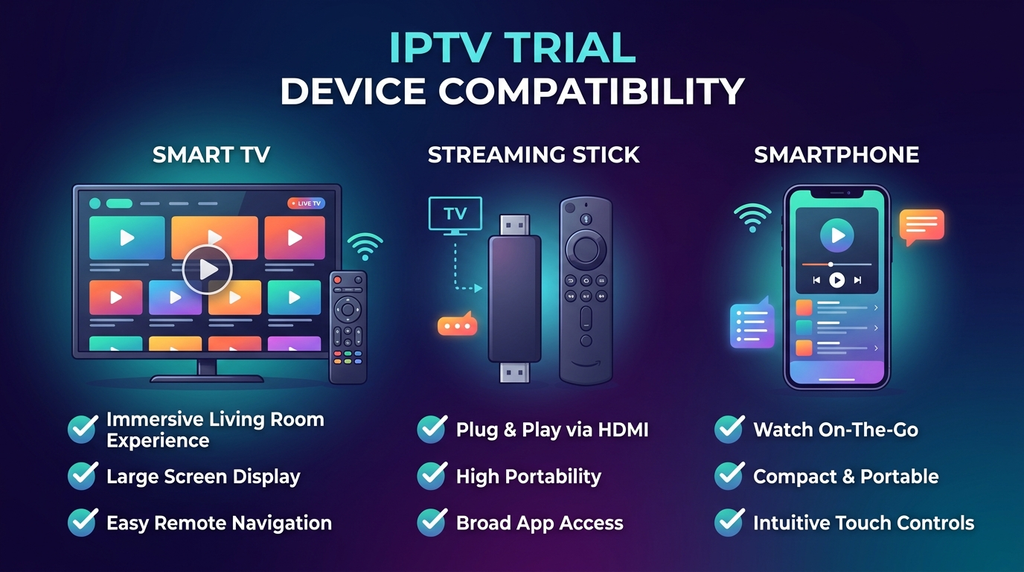
| Phone or laptop | Use an appropriate official app or supported browser | Mobile results do not automatically represent TV performance |
Amazon provides official instructions for downloading Fire TV apps, while Google explains how to install applications on Google TV. Both are better starting points than downloading random installer files from messaging groups.
Fire TV: what to check first
Connect the stick to the internet and install any available system updates. Search the supported app store, verify the application publisher and confirm that the player accepts the account format you were given. Open the app, add only authorised credentials, and test with your normal television remote. If the app is missing, check supported alternatives rather than assuming an unverified APK is necessary.
Android TV or Google TV: focus on the remote experience
A phone app may display video but remain inconvenient on a television. Check remote navigation, favourites, categories and guide readability. Our Android TV player comparison discusses these practical differences. A premium player upgrade should be considered separately from the content subscription and should not be purchased solely to fix an unverified service-side issue.
Samsung, LG and Apple TV: match the platform
Find the exact model and operating system in Settings, then confirm an appropriate application exists in that platform’s store. Request the supported login format in advance. If you have an older television with limited app support, a compatible external streaming device may be simpler, but its availability and cost should be checked independently.
Understand players, accounts and connection limits
A streaming player is software; an IPTV subscription or authorised playlist is a source of content. For example, Smarters Pro’s own website states that its player does not provide or sell IPTV channels or packages. Installing a player therefore does not give you an entitlement to subscription programming.
Login instructions commonly refer to an M3U playlist or an Xtream-style account method. These are ways a compatible player can obtain account or playlist information; neither creates content rights. Our guide to Xtream Codes versus M3U explains the practical format differences and why the electronic programme guide (EPG) is separate from playback.
Keep account credentials private. If the app asks for a server address, use the exact address supplied through the authorised provider’s genuine channel. Do not search for guessed server URLs, paste credentials into unknown websites or publicly share screenshots that expose usernames and passwords.
For multi-room households, test simultaneous playback only within the allowance of the relevant subscription. Ask whether the provider distinguishes registered devices, active streams and location restrictions. An application may be installed on several screens even when the account permits only one active stream.
Fix common problems before judging the service
A failure can come from the network, app, account, device or stream source. Work through the most reversible checks first.
| Symptom | First safe check | What the result may suggest |
|---|---|---|
| Login is rejected | Compare username, password, login type and exact server address | A typo, incompatible format or account issue |
| Video buffers on every authorised stream | Test another legitimate streaming app, restart the router and try stronger Wi-Fi or Ethernet | A device or network problem may contribute |
| One channel fails but others work | Note the programme and time, then ask the provider to investigate | A source-specific issue may be involved |
| Audio plays without picture | Check app/device updates and supported video output settings | A decoder or codec compatibility issue may be involved |
| EPG is empty | Refresh guide data and check whether the service supplies it | Guide data or mapping may be missing |
| Second device stops the first | Confirm the number of permitted simultaneous streams | The connection allowance may have been reached |
| App crashes | Update the app, restart the device and check storage | App version or device limitations may contribute |
| Favourites do not persist | Check the player’s save method and app-specific documentation | A player-side setting or version issue may be involved |
If a UK programme guide appears consistently one hour out, check the device timezone and player guide offset first: the UK switches between Greenwich Mean Time (GMT) and British Summer Time (BST). Do not assume this offset proves a provider-side fault.
If your player displays an authorisation error, the IPTV Smarters login troubleshooting guide explains how to distinguish credential, player and account problems. Avoid repeatedly clearing app data or changing DNS settings without a reason. Preserve the original details, test one change at a time and contact the legitimate provider when the account itself appears inactive.
Do not treat use of a VPN as proof of privacy or legal permission. A VPN cannot grant broadcasting or distribution rights, and it may introduce another variable into your network tests.
IPTV legality and TV Licence rules in the UK
IPTV technology is not inherently illegal in the UK. Official broadcasters and authorised services can legitimately deliver programming over the internet. Problems arise when content is distributed or accessed without the copyright owner’s permission. The UK government’s official illicit-streaming guidance explains this distinction.
A trial is not a licence check. An attractive interface, familiar player, card payment, working stream or advertised sports schedule does not verify distribution rights. If rights are unclear, request substantiation before paying. Recent enforcement also underscores the risk: the City of London Police reported a major illegal-streaming infrastructure seizure in June 2026 and warned that illicit services can expose users to data and security risks.
A separate UK rule concerns television licensing. According to TV Licensing’s guidance, you generally need to be covered by a TV Licence to watch or record live television through any TV or streaming service, and to use BBC iPlayer, including its on-demand programmes. Merely paying for a streaming subscription does not replace that requirement. Other on-demand-only viewing has different rules, so check the official guidance for your circumstances.
These are separate questions: Does the content provider hold the necessary rights? and Does the household need a TV Licence for the way it watches? One does not answer the other.
Free and legitimate alternatives
Not everyone searching for an IPTV trial actually needs a subscription trial. Some want free UK television, while others want to evaluate whether internet-delivered TV suits their home.
Freely is a broadcaster-backed UK service bringing together live and on-demand TV through supported televisions and streaming devices. It is presented as free to access, but compatible hardware is required and TV Licence obligations still apply to live TV and BBC iPlayer. Visit Freely’s official website to check current equipment support.
Official broadcaster services such as BBC iPlayer, ITVX, Channel 4 and Channel 5 offer UK programming through their own services, subject to their respective terms, availability and TV Licence rules. For premium programmes and sports, consult the authorised broadcaster or rights holder directly about current packages, offers and any genuine trial or short-term membership. Do not assume a free trial is currently offered unless the official provider states it.
| Your main goal | Start by evaluating | Why it may fit |
|---|---|---|
| Free-to-access UK television | Freely or official broadcaster platforms | Direct access through established UK services |
| A specific premium programme or sporting event | Its authorised UK rights holder | Makes content rights and package scope clearer |
| Testing a particular IPTV player | An authorised playlist or source you already have | Separates player compatibility from a new subscription purchase |
| Trying a commercial internet-TV package | A verified trial or shortest suitable authorised plan | Limits commitment while checking real-world performance |
The best option is the one that lawfully offers what you intend to watch and works on the hardware you already own—not necessarily the one advertising the largest catalogue.
Compare your trial results
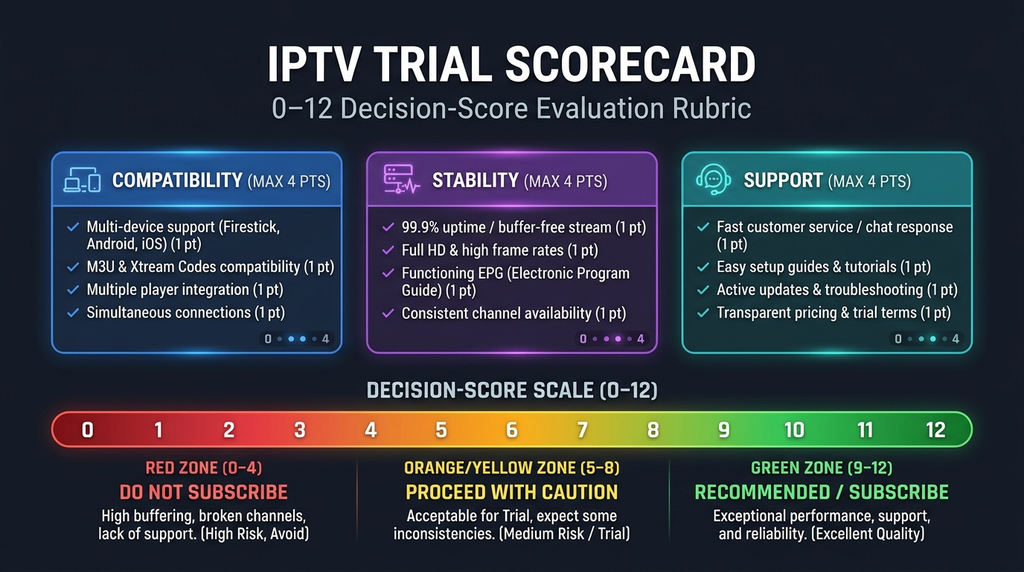
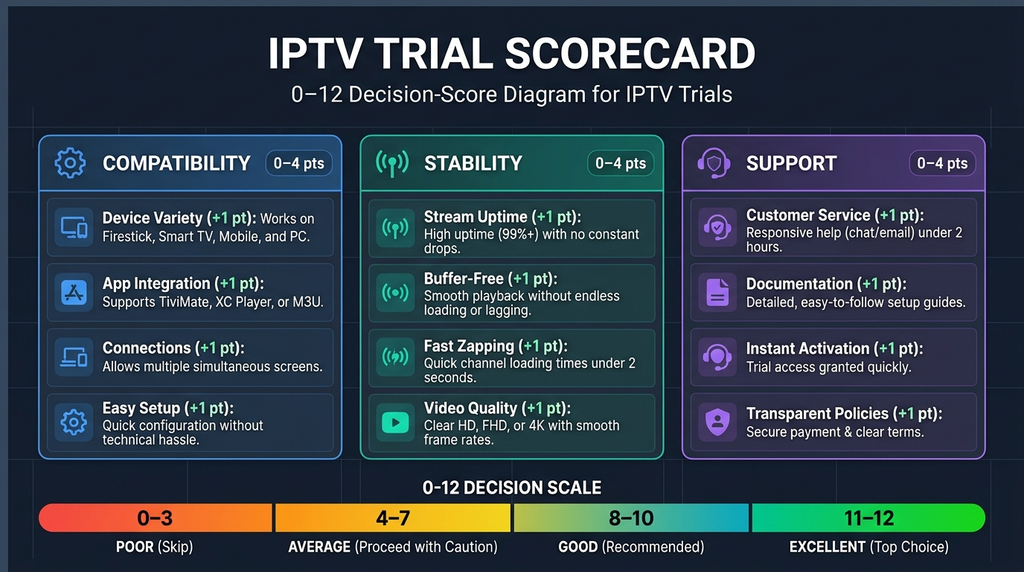
Use this small scorecard to avoid deciding purely on marketing claims. It is a personal decision aid, not an independent provider ranking or laboratory benchmark.
First apply two pass/fail checks: (1) you can reasonably verify the provider’s identity and distribution rights for the relevant content; (2) the price, renewal and cancellation terms are clear. If either fails, do not proceed to a longer purchase merely because playback looked good.
Then score each category from 0 (unacceptable) to 2 (meets your needs):
| Category | 0 points | 1 point | 2 points |
|---|---|---|---|
| Main device compatibility | Unusable | Partially usable | Works as intended |
| Normal-time playback | Frequent problems | Mixed results | Suitable during tested sessions |
| Guide and navigation | Missing or inaccurate | Some limitations | Fits your viewing habits |
| Support response | No useful answer | Partially helpful | Clear, actionable answer |
| Simultaneous use | Cannot meet need | Uncertain or restricted | Matches stated household needs |
| Privacy and account handling | Serious concerns | Some unclear details | Terms and procedures are understandable |
Your total can range from 0 to 12, but no score predicts future performance or compensates for missing rights and unclear billing. Write down the date, devices, network and observations beside the score so your decision can be revisited later.
Frequently asked questions
Is there a genuine IPTV free trial in the UK?
Some providers advertise genuine free tests, while others offer paid short-term access or conditional refund arrangements. Verify the exact offer directly with the provider and check that the content is authorised for UK distribution. Do not assume a trial exists merely because it appeared in an older article.
How long should I test an IPTV service?
Long enough to try your usual device and normal viewing period. If a trial ends before the time you typically watch, it may be insufficient for assessing performance. No fixed duration guarantees reliability.
Does an IPTV free trial include every live channel and film?
Not necessarily. A trial may have limits, and the provider must have appropriate distribution rights for any protected content. Request the current included features rather than assuming that an advertised category or channel-count figure applies to your test.
Can I test IPTV on an Amazon Fire TV Stick?
You can test an authorised source through a player that is compatible with your specific Fire TV model and permitted in your region. Check the Fire TV Appstore first and verify the login method before installing software.
Is IPTV Smarters Pro a free IPTV subscription?
No. Smarters Pro describes itself as a media player that does not sell or provide television channel packages. Its app features and any content subscription are separate. Check current app pricing and availability directly with the developer.
Do I need a UK TV Licence when watching IPTV?
Generally, yes if you watch or record live TV through any television or streaming service, or if you use BBC iPlayer, including on-demand BBC programmes. The rules differ for some other on-demand-only services. Consult TV Licensing’s official guidance for your situation.
Does a trial prove the provider is legal and reliable?
No. Working playback during a test does not prove ownership of broadcasting rights, secure payment practices, future uptime or continued availability. Check each of those separately and avoid sellers who cannot answer basic rights and billing questions.
What if the free trial buffers or the login fails?
Verify the account details and app compatibility first, then compare with another authorised streaming app on the same network. Test a stronger Wi-Fi signal or Ethernet when practical, note whether one programme or every programme fails, and send those observations to support.
Conclusion: choose clarity before commitment
A useful IPTV free trial UK offer helps you evaluate legitimate content access, technical compatibility and clear commercial terms—not just whether a stream opens for a few minutes. Verify the seller and content rights, distinguish a free trial from a refund policy, check renewal conditions, then test on your usual device at your normal viewing time.
If you are considering Digital Lizard IPTV, review its published plan information and use its contact page to ask whether a UK trial is currently available and to obtain written confirmation of the applicable content rights, prices, device support and cancellation terms before placing an order. There is no verified active free-trial offer on the reviewed public pages at the time of this editorial check.