
Searching for Strong8K usually leads to a difficult question: which website , app, or subscription is the buyer actually evaluating? Several sellers use similar Strong8K wording, yet their prices, channel counts, device rules, apps, and support claims do not always match.
This guide helps you judge a Strong8K offer without relying on the logo or an impressive channel number. You will learn what to verify, which devices need extra attention, what “8K” realistically means, how to test performance, and when a different, more transparent IPTV option may be the smarter purchase.
Table of Contents
Table of Contents
What Is Strong8K?
Strong8K is a name used online for IPTV-related subscriptions, apps, and reseller offers rather than a recognized technical standard. An offer may provide live channels, video on demand, an electronic program guide, and login details for a compatible player. Buyers should verify the exact seller, service terms, content authorization, and supported devices before paying.
The name does not identify the operator or prove that every stream is available in 8K.
In current search results, multiple websites use Strong8K or closely related names. They advertise different catalog sizes, prices, trial terms, apps, and device limits. That inconsistency is the first issue a careful buyer should resolve.
Why the Strong8K Name Can Be Confusing
Imagine that one Strong8K page promises one connection, another promotes four simultaneous devices, and a third focuses on reseller credits. Those may be different sellers, different packages, or entirely different services.
Before comparing prices, record the exact domain, company or seller name, support address, checkout page, and written terms. Take screenshots of the offer and save the receipt. If support later sends you a different domain or app, ask why before installing anything.
A trustworthy seller should answer basic questions consistently:
- Which legal entity or business fulfills the order?
- What licensed content or authorized playlist does the subscription include?
- Which app is required, and who publishes that app?
- How many devices may be registered?
- How many devices can stream at the same time?
- What is the written cancellation or refund process?
- Which support channel handles activation and technical problems?
If the answer changes depending on the page or salesperson, pause the purchase.
Is Strong8K Legal in the United States?
IPTV technology is legal in the United States, but a particular service is lawful only when it has permission to distribute the content it offers. A player app does not supply those rights. Before buying Strong8K or any IPTV subscription, verify the provider’s identity, licensing explanation, terms, and official content sources.
IPTV simply means video delivered through internet protocol. Services operated by established broadcasters, cable companies, and licensed streaming platforms use the same general technology.
The risk appears when a seller redistributes copyrighted channels, sports, movies, or series without authorization. A polished checkout page or a large on-demand library does not prove distribution rights.
How to Check Whether a Provider Is Authorized
Use evidence you can verify instead of relying on labels such as “premium,” “official,” or “100% legal.”
- Identify the operator. Look for a real business name, working contact information, terms of service, privacy policy, and a consistent billing descriptor.
- Ask about content rights. A legitimate provider should be able to explain how its channels and programs are authorized for your region.
- Check official distribution. Confirm whether the relevant broadcaster, network, or rights holder lists the service as an authorized way to watch.
- Review the payment process. Avoid sellers that pressure you toward an irreversible payment method while refusing to provide clear terms or an invoice.
- Read the refund policy before paying. Check the time limit, exclusions, procedure, and who decides whether a technical issue qualifies.
- Treat impossible offers as warning signs. An enormous collection of premium networks from many countries at a tiny price deserves more scrutiny, not less.
The U.S. Copyright Office publishes the federal copyright law, while the FTC’s online-shopping guidance explains practical ways to research unfamiliar sellers and protect payment information.
Strong8K Features That Matter Before You Subscribe
The best subscription is not the one with the longest feature list. It is the one that provides the content you are authorized to watch, works reliably on your devices, and comes with clear terms and useful support.
| Buying factor | What to verify | Why it matters |
|---|---|---|
| Provider identity | Business, domain, billing name, contact details | Similar Strong8K names may refer to different sellers |
| Content rights | Authorization for channels and VOD in your region | IPTV technology does not automatically make a catalog legal |
| Device support | Exact device model, operating system, approved app | “Smart TV compatible” is too broad |
| Stream quality | Resolution of the specific feeds you watch | An 8K brand name does not guarantee 8K content |
| Connections | Registered devices vs. simultaneous streams | Logging in on three devices may still allow only one active stream |
| Trial | Duration, features, channel access, support | A useful trial should resemble the paid service |
| Refund terms | Deadline, exclusions, request method | Verbal promises are difficult to enforce |
| Support | Hours, channels, response expectations | Fast help matters during activation and outages |
Channel and VOD Transparency
Huge catalog totals are easy to advertise and difficult for a buyer to verify. More channels can also mean more duplicates, regional variants, broken feeds, or categories you will never open.
Ask for a current list covering the specific networks, languages, sports, and local stations you care about. Then test those exact items during peak evening hours or during a live event, when demand is more revealing.
Picture Quality Beyond the 8K Label
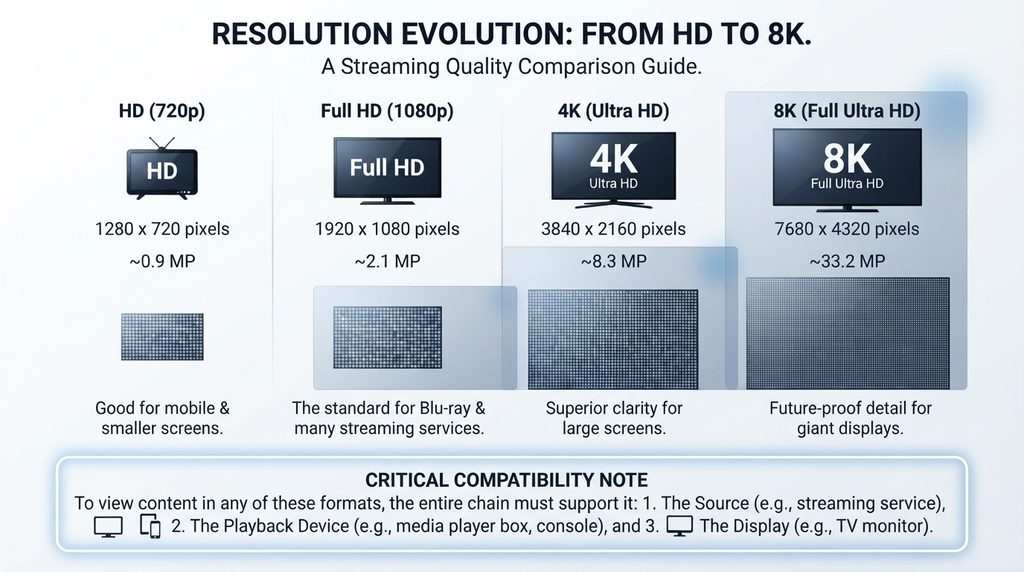
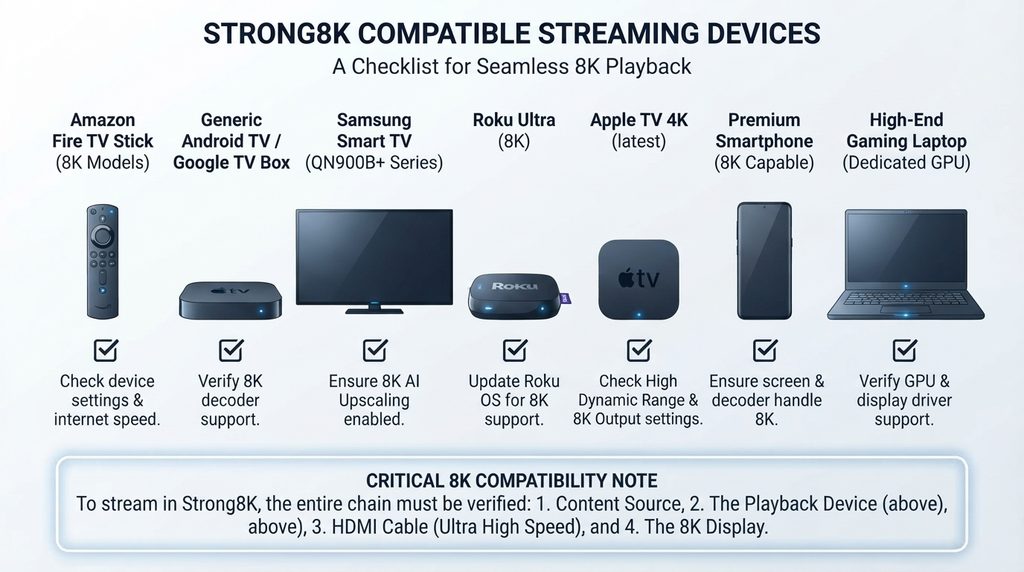
“8K” in Strong8K is branding unless the provider identifies actual 7680×4320 sources. The final picture depends on the original feed, encoding, bitrate, player, network, streaming device, HDMI path, and television.
Many mainstream streaming devices output no more than 4K. Amazon’s current Fire TV device specifications, for example, list 4K limits for its 4K streaming sticks rather than 8K output.
That does not make a service bad. Stable 1080p or genuine 4K can look excellent. It simply means the buyer should judge visible quality and stability rather than treating the service name as a technical guarantee.
During a trial, watch motion-heavy content and examine:
- Resolution consistency rather than the label shown in the menu
- Blockiness during fast movement
- Frame-rate smoothness
- Audio synchronization
- Startup time when changing channels
- Drops in quality during peak hours
- HDR performance, if your full setup supports it
Device Compatibility and Player Support
An IPTV subscription usually provides access details; the player is a separate application. Compatibility therefore depends on both the service’s supported login method and the apps available for your device.
Ask whether the provider supports a secure portal login, an M3U playlist, or another standard method. Never post credentials publicly, and do not reuse a password that protects email, banking, or another important account.
Connections, Household Use, and Travel
“Works on multiple devices” and “includes multiple connections” are not the same promise.
A one-connection plan may allow installation on a TV, phone, and tablet but permit only one stream at a time. Starting a second stream could stop the first or trigger an account restriction.
Before buying, confirm:
- Maximum registered devices
- Maximum simultaneous streams
- Whether all devices must use the same home network
- Whether travel or mobile viewing is permitted
- Whether a VPN is allowed or required
- Whether extra connections cost more
Choose the connection count based on simultaneous viewers, not the number of screens in the house.
Trial, Refund, and Support Terms
A short trial is useful only if it lets you test your real setup. Install the intended app, use the same internet connection, and open the channels you plan to watch.
Test at quiet and busy times. Contact support with one genuine setup question and note how clearly they respond. A quick sales reply is not the same as competent technical support.
Request written refund terms before payment. “Money back if it does not work” leaves too much undefined. You need to know the deadline, eligible problems, troubleshooting steps, exclusions, and refund method.
Strong8K Device Compatibility Guide
Do not accept “works everywhere” as a complete answer. Use this table to identify the question you need to ask for each platform.
| Device | Practical compatibility | What to confirm before buying |
|---|---|---|
| Fire TV Stick | Often flexible, but app availability varies by model and region | Exact app, store availability, supported login, and maximum output resolution |
| Android TV / Google TV | Usually offers several legitimate player choices | App developer, permissions, login format, codec support |
| Samsung / LG TV | Depends on TV model, year, region, and app store | Exact player listed in the TV’s official store |
| Roku | Uses Roku’s approved app ecosystem | Whether an approved Roku app supports the service; do not assume Android instructions apply |
| Apple TV | Requires a compatible tvOS player available through Apple | App name, developer, subscription fee, and playlist/login support |
| Phone / tablet | Commonly supported through iOS or Android apps | Mobile-data use, casting, background playback, and account limits |
| Windows / Mac | Browser or supported desktop player may work | Secure login method, app source, and operating-system support |
Strong8K on Firestick and Android TV
Start with the official app store. Confirm the publisher name and permissions before installation. If a seller insists on an unknown APK or short numeric download code, ask for the developer’s official website, file checksum, privacy policy, and reason the app is not distributed through a trusted store.
Sideloading is not proof of malware, but it removes part of the review and update process provided by an app store. Do not disable security settings casually, and never install a file from a domain that the seller cannot verify.
Strong8K on Samsung and LG Smart TVs
Samsung and LG televisions use their own app ecosystems. An Android APK cannot normally be installed directly on these TVs.
Open the television’s official app store and search for the exact recommended player. Samsung’s Smart TV app guidance explains how apps are installed and managed on supported models.
Some players are free to download but require a separate activation payment. That payment goes to the player developer and may not renew the IPTV service itself. Clarify both charges before assuming the service expired.
Strong8K on Roku and Apple TV
Roku is more restrictive than Android-based devices. Use only apps available through Roku’s supported distribution system and verify that the provider’s login method is compatible. Roku’s official instructions explain how to add apps to a Roku device.
On Apple TV, find a reputable tvOS player in the App Store and review its privacy information, developer, supported playlist formats, and in-app fees. Do not assume an iPhone app automatically has an Apple TV version.
How to Set Up a Legitimate Strong8K Service Safely
The exact screens vary by provider and app, but a safe installation follows a consistent process.
- Verify the seller and offer. Save the plan page, terms, receipt, support contact, and exact domain.
- Confirm your device. Provide the model and operating system, not only “Smart TV.”
- Choose a trusted player. Use the official store whenever possible and verify the app publisher.
- Receive the supported login format. The provider may supply a portal URL, username and password, or a playlist URL. Keep them private.
- Install and update the app. Grant only permissions that make sense for video playback.
- Enter credentials carefully. A missing character, added space, or
http/httpschange can prevent login. - Organize the interface. Load the EPG, set favorites, configure subtitles, and enable parental controls where supported.
- Test several streams. Check live TV, VOD, audio, guide data, and channel switching.
- Record support details. Save the renewal date and official troubleshooting contact.
Never send login credentials in a public forum or screenshot them in a review. If you believe they were exposed, ask the provider to replace them.
Strong8K Pricing: How to Compare Plans
Strong8K pricing cannot be judged by the name alone because different websites publish different offers. Compare the exact seller’s current checkout price and written inclusions on the day you buy.
Calculate the effective monthly price, but do not let a low long-term average hide a large commitment. Reliability, authorization, device support, and refund clarity are more important than the biggest percentage discount.
| Plan type | Best for | Main advantage | Main risk |
|---|---|---|---|
| Trial | Compatibility and peak-hour testing | Lowest commitment | May have limited channels or a short test window |
| One month | New customers and uncertain setups | Easy to stop or change | Higher monthly cost |
| Three to six months | Users satisfied after testing | Balance of price and commitment | Service quality can change during the term |
| Twelve months | Established, verified customers | Often lower effective monthly price | More money at risk if support or availability changes |
| Multi-connection | Families with simultaneous viewers | Prevents stream conflicts | Costs more and may have network restrictions |
Monthly vs. Long-Term Plans
Start short when the provider, seller, or app is unfamiliar. A working 24-hour test is helpful, but one good day cannot demonstrate months of stability.
A longer plan makes more sense after you have verified the operator, tested at real viewing hours, confirmed the refund terms, and received reliable support.
Before deciding, compare the current options on the IPTV pricing plans page and verify what is included with each duration.
Choosing the Right Number of Connections
Count the maximum number of people likely to watch at the same time. A couple with one shared television may need one connection even if both phones have the app installed. A household that watches sports in the living room while children use another TV needs at least two simultaneous connections.
Ask whether extra connections share one expiration date and whether they must use the same IP address. Those rules affect families, split households, travelers, and vacation homes.
Strong8K Pros and Cons
Because offers using the Strong8K name vary, these are potential advantages and concerns to verify rather than promises about every seller.
Potential advantages
- Flexible use through common IPTV player formats
- Access across several popular device categories
- EPG, favorites, catch-up, or VOD features where supported
- Short and long subscription choices from some sellers
- Multi-connection options for households from some providers
- Trial access may be available before purchase
Potential concerns
- Multiple websites use similar branding and make conflicting claims
- “8K” may describe the brand rather than actual stream resolution
- Content authorization may be unclear
- App, activation, and subscription fees can be separate
- Device compatibility may be stated too broadly
- Channel totals and uptime claims can be difficult to verify
- Long prepaid terms increase the buyer’s risk
Strong8K Alternatives: A Simple Decision Framework
Do not compare providers only by channel count. Compare the evidence behind the offer.
Score each option from zero to two on these five questions:
- Identity: Is the operator and billing party clear?
- Authorization: Does the provider explain its right to distribute the content?
- Compatibility: Has the exact device and app been confirmed?
- Transparency: Are connection, renewal, refund, and support terms written clearly?
- Performance: Did the service pass a real trial during peak viewing hours?
A provider scoring eight to ten deserves further consideration. A score below six means important evidence is missing.
Use the Digital Lizard IPTV subscription page to compare available options, then contact support with your device model, required channels, region, and simultaneous-viewing needs. The goal is not to choose the loudest brand. It is to choose the clearest suitable offer.
Troubleshooting Strong8K Buffering and Login Problems
Buffering may come from the home network, Wi-Fi interference, device resources, player settings, the source feed, or account limits.
| Symptom | Likely checks | Best first action |
|---|---|---|
| Credentials rejected | Typo, expired account, wrong portal, extra spaces | Retype details and confirm the portal with official support |
| App opens but playlist does not load | Server issue, blocked request, unsupported format | Test another supported player or network without exposing credentials |
| One channel buffers | Source-specific problem | Test several unrelated channels |
| Every channel buffers | Network, device, player, or service congestion | Restart the device and router, then run a wired or 5 GHz test |
| Second TV stops the first | Connection limit reached | Confirm simultaneous-stream allowance |
| No sound | Unsupported audio track or output setting | Change the audio track and test stereo output |
| EPG is empty | Guide not loaded, wrong time zone, provider issue | Refresh the EPG and verify time-zone settings |
| TV app requests payment | Separate player activation may have expired | Check whether the fee belongs to the app developer or service provider |
Follow this sequence:
- Test a second channel and one VOD title.
- Restart the player and streaming device.
- Reboot the router.
- Move to 5 GHz Wi-Fi, Ethernet, or a stronger access point.
- Close background apps and clear only the player’s cache.
- Test the same account on another supported device, respecting connection limits.
- Record the time, channel, device, app version, and error message, then send that evidence to support.
Common Strong8K Buying Mistakes
Assuming every Strong8K website is the same company
Similar domains and logos can represent separate sellers. Save the exact page and confirm who will support the order.
Paying for a year before testing the main device
A phone test cannot prove that the chosen Samsung TV, Firestick, Roku, or Apple TV setup will work. Test the living-room device first.
Confusing app activation with service renewal
Some IPTV players charge their own license or activation fee. Paying the player may unlock its interface but does not necessarily extend the content subscription.
Believing the 8K label guarantees 8K playback
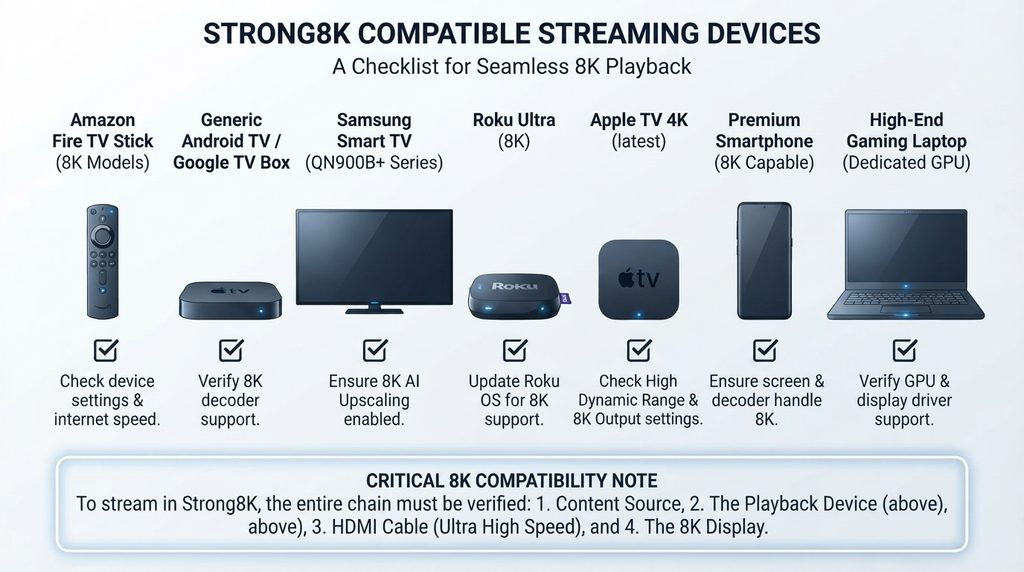
The source, player, device, HDMI equipment, television, and connection all have to support the same format. Ask which specific streams are truly 8K.
Ignoring simultaneous-connection rules
Installing the service on several devices does not automatically allow them to play at once.
Choosing only by the lowest price
An inexpensive plan that lacks authorization, clear terms, stable playback, or responsive support is not good value.
Installing an unverified APK
Only install from a trusted store or a developer source you can validate. Unknown files can create privacy and security risks.
Strong8K Pre-Purchase Checklist
Use this checklist before buying any Strong8K subscription:
- I know the exact seller, website, and billing name.
- I reviewed the terms, privacy policy, and refund process.
- I asked how the content is authorized for my location.
- I confirmed my exact device model and operating system.
- I found the recommended app through a trusted source.
- I know whether the player has a separate fee.
- I confirmed registered-device and simultaneous-stream limits.
- I tested my most important channels and features.
- I tested during peak viewing hours.
- I verified subtitle, audio, EPG, and parental-control needs.
- I contacted support and received a clear answer.
- I understand renewal dates and cancellation steps.
- I chose the shortest sensible commitment for my confidence level.
If several boxes remain unchecked, compare another provider before paying.
Final Verdict: Is Strong8K Worth It?
Strong8K may be worth considering only after the exact seller passes identity, authorization, compatibility, performance, and support checks. The name and 8K promise are not enough because similarly branded offers can have different terms and capabilities.
For most first-time buyers, the logical path is to verify the provider, test the main device, confirm simultaneous connections, and start with a shorter commitment. Compare transparent options on the pricing page or use the setup guide to check your device before choosing a subscription.
FAQ
What does Strong8K mean?
Strong8K is a brand-style term used by several IPTV-related websites and offers. It is not an independent streaming specification or a guarantee that every channel is delivered in 8K resolution. Verify the exact seller and plan behind the name.
Does Strong8K really stream in 8K?
Do not assume so. Ask the seller to identify specific 8K streams and supported codecs. Your player, streaming box, television, HDMI equipment, and connection must also support 8K. Many popular streaming sticks are designed for up to 4K output.
Is Strong8K legal in the USA?
IPTV technology is legal, but legality depends on whether the specific provider has permission to distribute its channels, sports, movies, and series. Review the operator’s identity and licensing explanation before subscribing.
Can I use Strong8K on a Firestick?
Possibly, if the exact service supports a reputable Fire TV player and your model supports the required video formats. Confirm the app name, publisher, login method, and connection limit before buying.
Will Strong8K work on a Samsung Smart TV?
It may work through a compatible player available in the Samsung app store. Compatibility varies by television model, year, region, app availability, and the provider’s login format.
Can I install Strong8K on Roku?
Only if an approved Roku app supports the provider’s access method. Roku does not follow the same installation process as Fire TV or Android TV, so verify compatibility before purchasing.
How many devices can use one Strong8K subscription?
That depends on the seller and plan. Ask separately about registered devices and simultaneous streams. A plan may allow login on several screens while permitting only one active stream.
Why does the IPTV app ask me to pay when my subscription is active?
The app and content subscription can be separate products. The player’s trial or license may have expired even though the provider account remains active. Check who issued the payment request before paying.
How can I reduce Strong8K buffering?
Test multiple channels, restart the device and router, use 5 GHz Wi-Fi or Ethernet, close background apps, and compare another supported device. If only one channel fails, the source feed may be the problem.
Should I buy a yearly Strong8K plan?
Choose a long plan only after verifying the operator, content rights, device compatibility, peak-hour performance, support, and refund terms. New customers are usually safer starting with a trial or shorter plan.